
Best for
- Large refactors spanning many files
- Multi-file color / style / naming / API migrations
- Broad codebase audits (security, a11y, performance, dead code)
OneWave-AI/claude-skills/agent-army/SKILL.md
Deploy a 2-layer parallel agent hierarchy for large, parallelizable work — big refactors, multi-file migrations, codebase-wide audits, bulk generation. A top-tier commander (Fable or Opus) orchestrates the swarms; the user picks a power level (Max Power / Heavy / Balanced / Economy) that sets the Opus/Sonnet/Haiku model mix per layer. Layer 1 is 3-50+ specialist agents, each with its own full context window; Layer 2 is 2+ sub-agents per member. Includes git safety, tiered sizing, a pre-deploy ga
Decision brief
A 2-layer parallel execution framework. The Commander is the top-tier model — Fable by default, or Opus if that's the session model — and does the thinking: recon, composition, briefing, verification. It orchestrates swarms of subordinate models whose tiers the user picks at dep…
In this controlled same-task single run, enabling agent-army changed the output from 2272 non-whitespace characters and 15 headings to 2261 characters and 17 headings. Matches among 8 signals extracted from the pinned source changed from 1 to 3. Both actual outputs are shown; this is a structural observation, not a quality score or a universal performance claim.
Produce a decision-ready research brief for a small SaaS team evaluating retrieval-augmented generation. State assumptions, evidence needs, tradeoffs, and next actions. The deliverable must specifically reflect this user intent: Deploy a 2-layer parallel agent hierarchy for large, parallelizable work — big refactors, multi-file migrations, codebase-wide audits, bulk generation. A top-tier commander (Fable or Opus) orchestrates the swarms; the user picks a power level (Max Power / Heavy / Balanced / Economy) that sets the Opus/Sonnet/Haiku model mix per layer. Layer 1 is 3-50+ specialist agents, each with its own full context window; Layer 2 is 2+ sub-agents per member. Includes git safety, tiered sizing, a pre-deploy ga
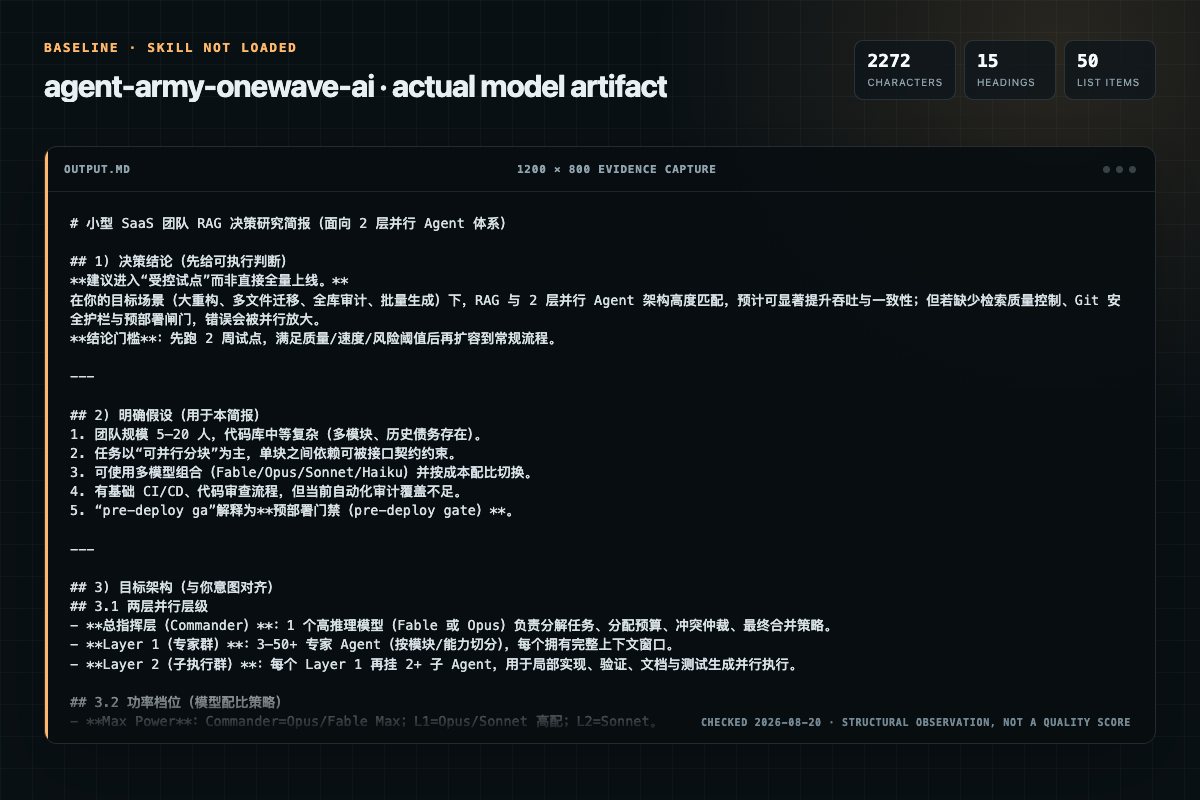
Baseline: 2272 non-whitespace characters, 15 headings, and 50 list items.
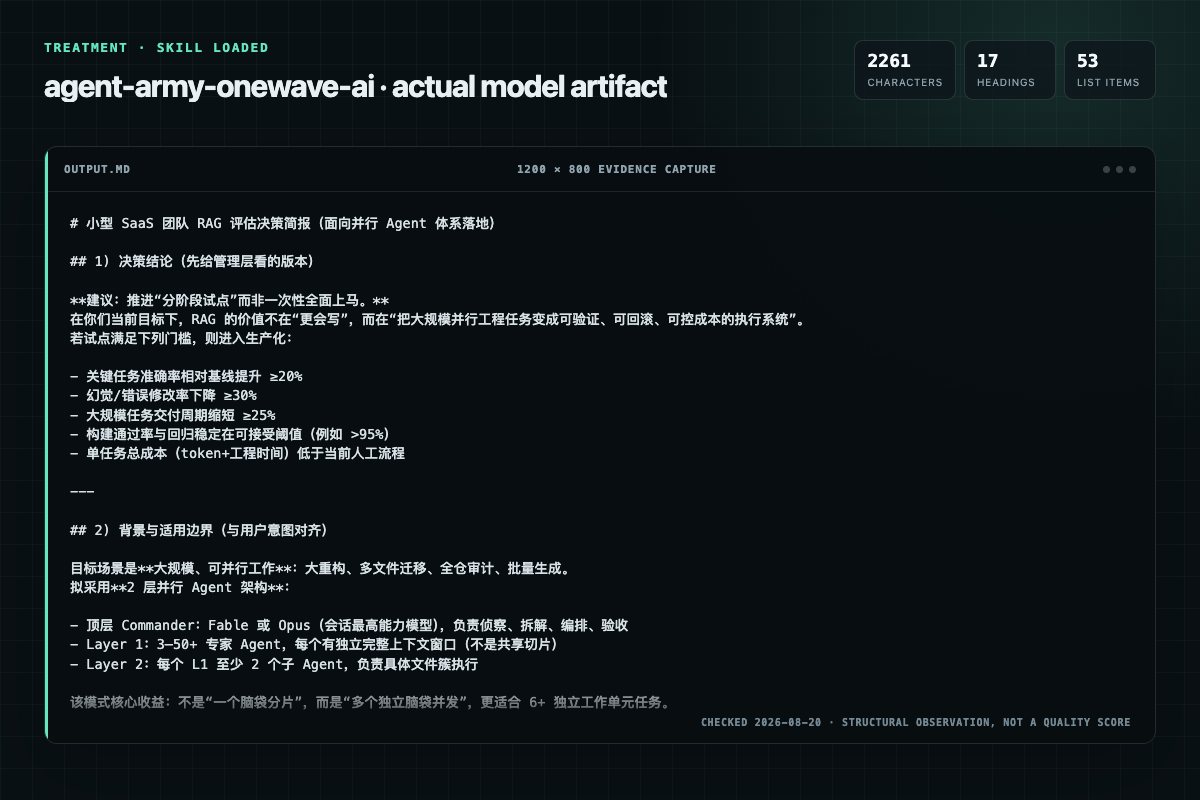
With Skill: 2261 non-whitespace characters, 17 headings, and 53 list items.
| Observation | Without Skill | With Skill |
|---|---|---|
| Source-signal coverage | 1/8: power | 3/8: power, level, checkpoint |
| Output structure | 2272 chars · 15 headings · 50 list items · 0 code blocks | 2261 chars · 17 headings · 53 list items · 0 code blocks |
| Verification and caution signals | 10 verification signals · 5 risk/limitation signals | 19 verification signals · 16 risk/limitation signals |
Use the agent-army Skill pinned at 82859c0ebaff for my task. Follow its source-specific constraints around `agent-army`, `mandatory`, `rules`, `power`, then return the finished deliverable with explicit assumptions, verification, failure conditions, and limits. Do not treat the Skill text as a factual source or claim that a single demonstration proves universal performance.
Compatibility matrix
| Platform | Status | Evidence | What to check |
|---|---|---|---|
| Codex | Not declared | No explicit evidence | Portability before use |
| Claude Code | Not declared | No explicit evidence | Portability before use |
| Cursor | Not declared | No explicit evidence | Portability before use |
| Gemini CLI | Not declared | No explicit evidence | Portability before use |
Installation
The source command is displayed only when detected. A safe inspection prompt is always available so your agent can explain every action before execution.
npx skills add https://github.com/OneWave-AI/claude-skills --skill "agent-army"Inspect the Agent Skill "agent-army" from https://github.com/OneWave-AI/claude-skills/blob/82859c0ebaff803889be6ca2efa0834ba8787773/agent-army/SKILL.md at commit 82859c0ebaff803889be6ca2efa0834ba8787773. List every install step, command, network request, credential, file read/write, external action, and rollback step. Explain whether it fits my task. Do not install or execute anything until I approve.
Workflow
Confirm in one line if the user already gave context: "Goal: [X]. Scope: [Y]. Tier: [Z]. Power: [P]. Starting." Otherwise ask for: goal (one sentence), scope (files/dirs/"everything"), constraints (don't touch X, match Y), tier, and power level.
1. git status — warn on uncommitted changes, offer to stash/commit first. 2. git checkout -b agent-army/checkpoint-{timestamp} then switch back. This is the rollback point. 3. No git repo? Warn that there's no safety net and get explicit confirmation.
1. Grep / Glob / Read to find every affected file. 2. Count the units of work. 3. wc -l each file. Flag 500+ line files as heavy → assign solo. 4. Classify into domains (by directory, import graph, file type, naming pattern). 5. Identify shared dependencies — foundation files im…
1. Foundation Agent for shared deps — runs before the parallel wave so dependents don't conflict. 2. Layer 1: one agent per domain; split large domains across multiple agents. 3. Layer 2: 2+ sub-agents per L1 agent, assigned by weighted file load, not file count: - Small (<200 l…
1. Foundation Agent first (if any), at the L1 tier. Wait for completion. 2. Launch ALL Layer 1 agents in parallel — runinbackground: true and model: "" on every call, in a single message. 3. Each L1 agent spawns its L2 sub-agents in parallel (per its brief). 4. Report each compl…
Permission review
The documentation asks the agent to read local files, directories, or repositories.
Grep / Glob / Read to find every affected file.The documentation asks the agent to read local files, directories, or repositories.
**Layer 2:** 2+ sub-agents per L1 agent, assigned by **weighted file load**, not file count:The documentation asks the agent to run terminal commands or scripts.
**Build** — run the build command. Record PASS/FAIL.Evidence record
| Signal | Value | Evidence type | Meaning |
|---|---|---|---|
| Quality score | 96/100 | Computed | Documentation, specificity, maintenance, and trust rules |
| Repository stars | 272 | Source | Repository attention, not individual Skill quality |
| Compatibility | 0 platforms | Source | Declared in the catalog source record |
| Usage guide | tested outcome page | Tested | Generated or reviewed according to the visible evidence level |
Pinned source
A 2-layer parallel execution framework. The Commander is the top-tier model — Fable by default, or Opus if that's the session model — and does the thinking: recon, composition, briefing, verification. It orchestrates swarms of subordinate models whose tiers the user picks at deploy time (see Power Level). Each Layer 1 agent has its own full context window (not a slice). Each spawns Layer 2 sub-agents under it. The result is many independent brains running at once — not one brain divided.
Commander (you — Fable or Opus, the session model)
 |
 |-- Layer 1: Team (3 to 50+, each = own 1M context, L1 tier from power level)
 |    |-- Agent A (1M) -- Sub-agent A1, A2, ...  (L2 tier)
 |    |-- Agent B (1M) -- Sub-agent B1, B2, ...  (L2 tier)
 |    |-- Agent C (1M) -- Sub-agent C1, C2, ...  (L2 tier)
 |    |-- ... (no cap)
Swarm vs. army: A swarm splits one context window across sub-agents — one brain, divided. An army gives each Layer 1 member its own window. That difference is the whole point of this skill.
If the task doesn't clearly fit, say so and propose doing it inline instead of spinning up an army.
model: explicitly on every Agent call at the user's chosen power level. Omitting it inherits the session model — that's a silent Max Power bill.[Agent N/M complete] name: X files modified, Y flags.Confirm a tier before starting. Present this table:
| Tier         | L1 Agents | Total w/ Sub-agents | Est. Tokens  |
|--------------|-----------|---------------------|--------------|
| Conservative | 3         | ~9                  | ~200-500K    |
| Standard     | 5-10      | ~15-30              | ~500K-1.5M   |
| Aggressive   | 10-20     | ~30-60              | ~1.5-4M      |
| Maximum      | 20-50+    | ~60-100+            | ~4M+         |
| Custom       | you pick  | you pick            | varies       |
Default to Standard on "just do it." After recon (Step 3), recommend a specific number based on what you found — e.g. "35 files across 6 domains → Aggressive: 8 L1 agents, 2-3 sub-agents each (~22 total, ~2M tokens). Adjust?" Token estimates are rough and scale with task complexity.
Size sets how many agents; power sets which models. Ask for both in one question (AskUserQuestion works well — size and power as two questions in one call). Skip asking if the user already named a power level or explicit models.
| Power Level         | Commander          | Layer 1 | Layer 2 | Best For                                        |
|---------------------|--------------------|---------|---------|-------------------------------------------------|
| Max Power           | Fable/Opus (session)| Opus   | Opus    | gnarly refactors, correctness-critical migrations|
| Heavy (recommended) | Fable/Opus (session)| Opus   | Sonnet  | most large tasks — smart orchestration, fast exec|
| Balanced            | Fable/Opus (session)| Sonnet | Sonnet  | mechanical migrations with clear patterns        |
| Economy             | Fable/Opus (session)| Sonnet | Haiku   | high-volume, dead-simple find/replace            |
Rules:
/model or claude --model fable) before deploying: commander quality is the ceiling on army quality.model: "<L1 tier>" for team members; L1 briefs instruct model: "<L2 tier>" for sub-agents.Mode: If scope is already concrete (file paths, exact changes, tier), skip to Step 3 (Quick Mode). Otherwise start at Step 1 (Full Mode).
Confirm in one line if the user already gave context: "Goal: [X]. Scope: [Y]. Tier: [Z]. Power: [P]. Starting." Otherwise ask for: goal (one sentence), scope (files/dirs/"everything"), constraints (don't touch X, match Y), tier, and power level.
git status — warn on uncommitted changes, offer to stash/commit first.git checkout -b agent-army/checkpoint-{timestamp} then switch back. This is the rollback point.wc -l each file. Flag 500+ line files as heavy → assign solo.Output: Files: N | Heavy: [list] | Domains: [list] | Shared deps: [list] | Build cmd: [cmd]
Output the army plan. Full Mode: pause for "Proceed?" Quick Mode: one-line summary, then deploy.
Output this checklist in your response before deploying. Don't check it mentally — write it out.
DEPLOYMENT GATE:
[ ] Every L1 brief contains "You MUST spawn N sub-agents"
[ ] Every sub-agent is named with specific files assigned
[ ] Every file is owned by exactly one sub-agent (no overlap, no gap)
[ ] L1 briefs include full sub-agent deployment instructions
[ ] Tier matches the user's selection
[ ] Power level set: model: "<L1 tier>" on every L1 call; L2 tier + escalations in every brief
All must PASS. Any FAIL → fix the plan before deploying.
run_in_background: true and model: "<L1 tier>" on every call, in a single message.[Agent N/M complete] name: results.git diff --stat and cross-reference against agent reports. Any agent that reported "COMPLETE, N files modified" with no matching diff lied or no-op'd — re-dispatch it. Trust the diff, not the report.Agents: N | Files modified: N (diff-confirmed) | Skipped: N | Build: PASS/FAIL
Flags: [list] | Phantom completions caught: N | Rollback: git checkout agent-army/checkpoint-{timestamp}
Each wave is a new, smaller, differently-specialized army. Pause for user approval before each. Max 4 waves.
| Wave | Name | Trigger | Purpose |
|---|---|---|---|
| 1 | Execute | always | make the changes |
| 2 | Audit | build fails, remaining violations, 20+ files, or flags > 0 | fresh agents review Wave 1 for correctness/edge cases |
| 3 | Propagate | changes touch APIs/types/interfaces; tests or docs reference old patterns | update tests, docs, configs, downstream callers |
| 4 | Notify | user opts in | draft PR description, changelog, Slack summary |
Each wave's report is the next wave's recon. After each, rerun Verify; stop when re-scan is clean and build passes, or at 4 waves.
For multi-wave or interruptible runs, write .army-state.md after Wave 1: files modified (diff-confirmed), open flags, unresolved issues, decisions. If a run is killed, the next invocation reads this file and resumes from the last clean wave instead of restarting. Skip for single-wave tasks.
This is what spawned agents actually see — the most important section in the skill.
You are [AGENT_NAME], specialist on [DOMAIN].

Objective: [one sentence]
Approved patterns: [exact values — hex codes, class names, API shapes]
Forbidden patterns: [what to remove/avoid]
Your files: [absolute paths with line counts]
Rules: [constraints]. Skip files already using approved patterns (idempotency).
Flag issues outside your files in "Flags for Commander" — do NOT fix them.

CRITICAL: You MUST use the Agent tool to spawn the sub-agents listed below. Do
NOT do the work yourself. Do NOT skip spawning. Deploy ALL sub-agents in a single
message with multiple Agent tool calls, passing model: "[L2_TIER]" on every call
[note escalations: except "NAME" which gets model: "[higher tier]"].

Sub-agents:
- "[NAME]": [files with line counts]
- "[NAME]": [files with line counts]

Pass each sub-agent: objective, their files, approved/forbidden patterns, rules,
report format. After all complete, aggregate their reports and verify (by re-reading
or grepping) that no forbidden patterns remain in your domain before reporting back.
You are [SUB_AGENT_NAME], working under [TEAM_MEMBER_NAME].

Objective: [one sentence]
Files you own: [absolute paths with line counts — touch only these]
Approved / Forbidden patterns: [exact values to use and remove]
Rules: [constraints]. Skip files already correct. Flag issues outside your files —
do NOT fix them.

Process: read each file fully → check idempotency → apply approved, remove forbidden
→ re-read to confirm no forbidden patterns remain.

Report: Files Modified (file: N replacements), Files Skipped (already correct),
Flags for Commander, Issues, Status (COMPLETE/PARTIAL/FAILED).
Every agent returns:
## Report: [Name]
Files Modified:   [file: N replacements]
Files Skipped:    [file: reason]
Flags for Commander: [issue or "None"]
Issues:           [issue or "None"]
Status:           COMPLETE / PARTIAL / FAILED
These are the failure modes this skill exists to prevent. If you catch yourself doing one, stop and correct.
git diff --stat cross-check, not by trusting the report.model: on Agent calls, so every sub-agent silently inherits the commander's model. The user picked Economy and got billed Max Power. Enforced by Mandatory Rule 2b + the Gate.User: "Replace all neon Tailwind colors with our sand palette across the site."
Recon: 45 files, 5 domains, 2 shared dependencies (a theme config + a shared <Button>). Build cmd: npm run build. Recommend Aggressive: 1 Foundation Agent + 5 L1 agents, 2-4 sub-agents each (~22 total). User picks Heavy power: Fable commander, Opus L1, Sonnet L2.
Wave 1 (Execute): Foundation Agent updates the 2 shared files first. Then 5 L1 agents deploy in parallel, each fanning out to sub-agents. Reports: 43 modified, 2 skipped (already correct), 3 flags.
Verify: git diff --stat shows 42 files changed — one agent reported a file it never touched (phantom). Re-dispatched; now 43 confirmed. Build passes. 3 flags + 2 edge-case violations remain → Audit wave recommended.
Wave 2 (Audit): 3 fresh agents target the flagged files and violations. Fixed. Build clean, re-scan clean. 4 test files import the changed <Button> → Propagate recommended.
Wave 3 (Propagate): 3 agents update the 4 test files + 1 doc. Build still green.
Final: 3 waves, ~28 agents total, 48 files touched (diff-confirmed), 1 phantom caught, zero violations remaining, clean build. Rollback branch available.
Frequently asked questions
A 2-layer parallel execution framework. The Commander is the top-tier model — Fable by default, or Opus if that's the session model — and does the thinking: recon, composition, briefing, verification. It orchestrates swarms of subordinate models whose tiers the user picks at dep…
The source record exposes this install command: npx skills add https://github.com/OneWave-AI/claude-skills --skill "agent-army". Inspect the command and pinned source before running it.
Static rules flagged read-files, exec-script in the source; the page lists the matching lines and excerpts.
Alternatives
vasilyu1983/AI-Agents-public
Scans public GitHub repos for agent skills, dev practices, and code patterns. Use when enriching skills, setting team policy, or researching a build domain.
drafthq/draft
Decompose project or track into modules with dependency mapping. Project scope updates architecture.md and derives .ai-context.md. Track scope generates hld.md (always) and lld.md (when --lld or High-complexity module triggers it) — design-mandated artifacts that drive implement, deploy-checklist, and upload sign-off.
microsoft/Sico
Execute Android UI workflows on a sandbox device, review results, and produce a structured execution report.
JasonColapietro/suede-creator-skills
Suede-owned Instagram growth operating system for account-specific audits, Reels, carousels, Stories, conversion mapping, calendars, and daily candidate-production loops. Use when the user names Instagram, IG, Reels, Stories, asks to analyze recent posts, grow a handle, run a daily workflow, create or repurpose Instagram content, or distinguish views from follows, leads, and sales. NOT FOR: multi-platform organic strategy (use suede-social), full video rendering or editing (use suede-video), pai