
Best for
- Use this skill when users mention "viral replication, viral cloning, copy video, clone video, similar video" or express the desire to create content similar to a popular video.
bytedance/agentkit-samples/skills/byted-kickart-overseas-viral-replicator/SKILL.md
Viral video replication tool that supports copying popular video structures, scripts, and styles to generate similar content. Use this skill when users mention "viral replication, viral cloning, copy video, clone video, similar video" or express the desire to create content similar to a popular video.
Decision brief
All user requests must complete the following 2 validation steps in order. Skipping is not allowed:
In this controlled same-task single run, enabling byted-kickart-overseas-viral-replicator changed the output from 1885 non-whitespace characters and 16 headings to 2282 characters and 15 headings. Matches among 8 signals extracted from the pinned source changed from 0 to 0. Both actual outputs are shown; this is a structural observation, not a quality score or a universal performance claim.
Create a launch deliverable for a privacy-first team collaboration product aimed at small engineering teams. Make it specific, usable, and ready for review. The deliverable must specifically reflect this user intent: Viral video replication tool that supports copying popular video structures, scripts, and styles to generate similar content. Use this skill when users mention "viral replication, viral cloning, copy video, clone video, similar video" or express the desire to create content similar to a popular video.
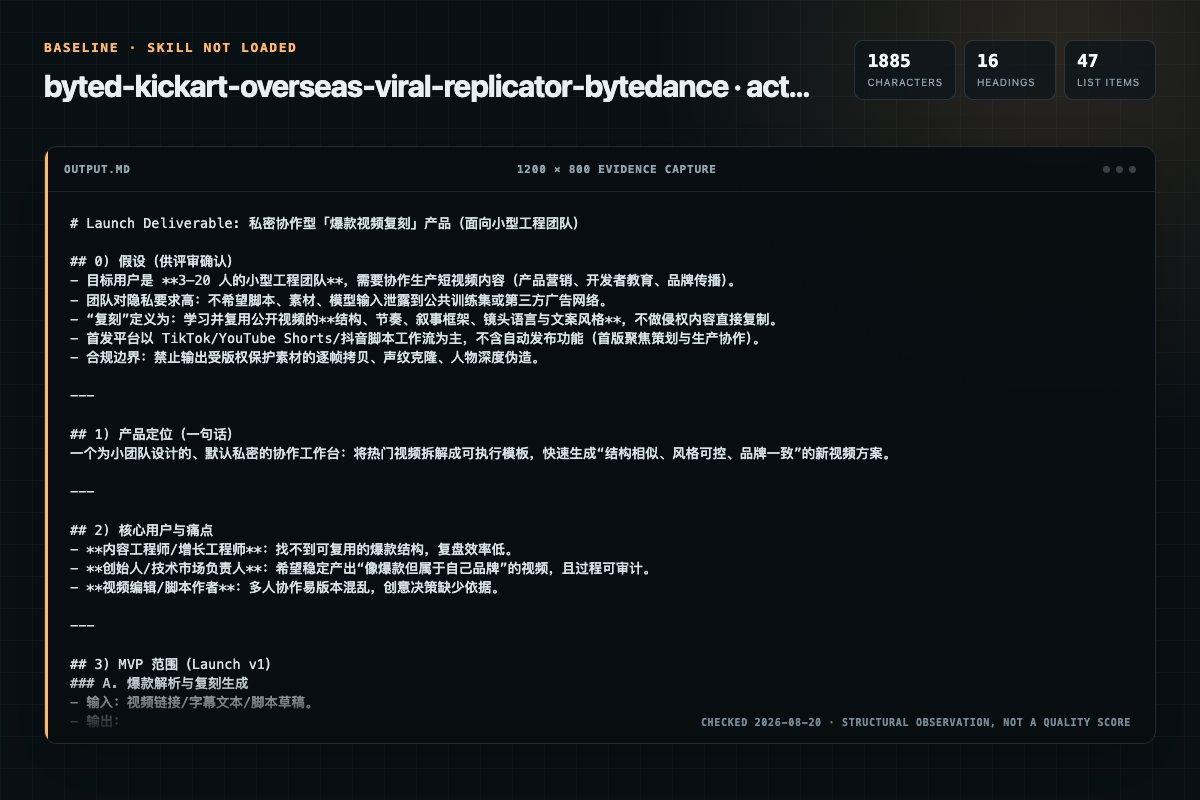
Baseline: 1885 non-whitespace characters, 16 headings, and 47 list items.
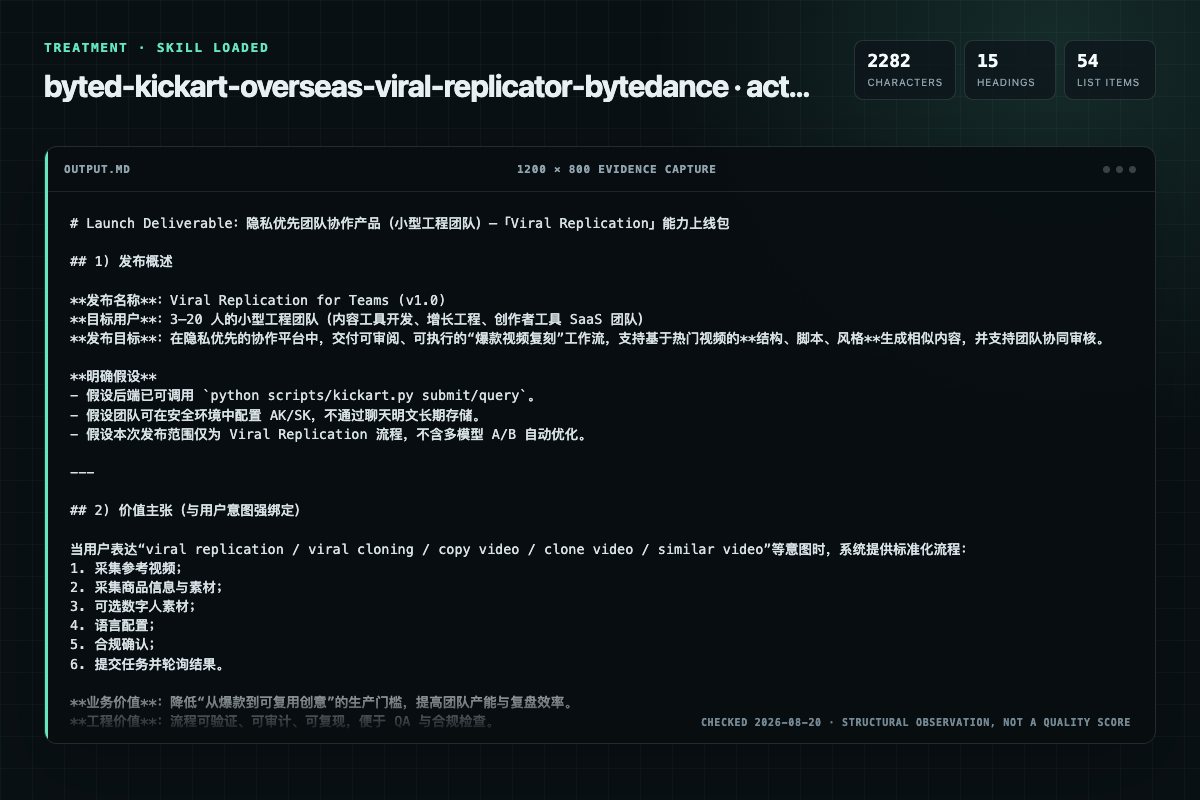
With Skill: 2282 non-whitespace characters, 15 headings, and 54 list items.
| Observation | Without Skill | With Skill |
|---|---|---|
| Source-signal coverage | 0/8: none | 0/8: none |
| Output structure | 1885 chars · 16 headings · 47 list items · 0 code blocks | 2282 chars · 15 headings · 54 list items · 0 code blocks |
| Verification and caution signals | 2 verification signals · 6 risk/limitation signals | 10 verification signals · 9 risk/limitation signals |
Use the byted-kickart-overseas-viral-replicator Skill pinned at 1709f1b13b08 for my task. Follow its source-specific constraints around `byted-kickart-overseas-viral-replicator`, `pre-validation`, `execute`, `order`, then return the finished deliverable with explicit assumptions, verification, failure conditions, and limits. Do not treat the Skill text as a factual source or claim that a single demonstration proves universal performance.
Compatibility matrix
| Platform | Status | Evidence | What to check |
|---|---|---|---|
| Codex | Not declared | No explicit evidence | Portability before use |
| Claude Code | Not declared | No explicit evidence | Portability before use |
| Cursor | Not declared | No explicit evidence | Portability before use |
| Gemini CLI | Not declared | No explicit evidence | Portability before use |
Installation
The source command is displayed only when detected. A safe inspection prompt is always available so your agent can explain every action before execution.
npx skills add https://github.com/bytedance/agentkit-samples --skill "skills/byted-kickart-overseas-viral-replicator"Inspect the Agent Skill "byted-kickart-overseas-viral-replicator" from https://github.com/bytedance/agentkit-samples/blob/0890278a6571e4190c1ab8cacd9becc147f74d9c/skills/byted-kickart-overseas-viral-replicator/SKILL.md at commit 0890278a6571e4190c1ab8cacd9becc147f74d9c. List every install step, command, network request, credential, file read/write, external action, and rollback step. Explain whether it fits my task. Do not install or execute anything until I approve.
Workflow
All user requests must complete the following 2 validation steps in order. Skipping is not allowed:
When the user first expresses intent for viral replication (mentions "viral replication, viral cloning, copy video, clone video, similar video" or equivalent expressions)
When the user first expresses intent for viral replication (mentions "viral replication, viral cloning, copy video, clone video, similar video" or equivalent expressions)
After the user has confirmed they want to use viral replication to create a video
After the user has successfully provided the reference video
Permission review
The documentation asks the agent to run terminal commands or scripts.
**Execute command**:The documentation asks the agent to run terminal commands or scripts.
#### Execute ScriptThe documentation includes network, browsing, or remote request actions.
python scripts/kickart.py submit --params '{"ref_video":"/path/to/video.mp4","product_url":"https://www.amazon.com/dp/B08N5WRWNW","product_images":[],"model_images":["/path/to/image1.jpg","/path/to/image2.jpg"],"language":"en"}'The documentation includes network, browsing, or remote request actions.
python scripts/kickart.py submit --params '{"ref_video":"/path/to/video.mp4","product_url":"https://www.ebay.com/itm/123456789","product_images":[],"model_images":["/path/to/image1.jpg"],"language":"en"}'Evidence record
| Signal | Value | Evidence type | Meaning |
|---|---|---|---|
| Quality score | 96/100 | Computed | Documentation, specificity, maintenance, and trust rules |
| Repository stars | 433 | Source | Repository attention, not individual Skill quality |
| Compatibility | 0 platforms | Source | Declared in the catalog source record |
| Usage guide | tested outcome page | Tested | Generated or reviewed according to the visible evidence level |
Pinned source
All user requests must complete the following 2 validation steps in order. Skipping is not allowed:
KICKART_ACCESS_KEY and KICKART_SECRET_KEY existClearly inform the user that Volcengine authentication information is missing
Guide new users to get AK/SK:
Script:
⚠️ Detected that you have not configured Volcengine authentication information
For new users: 1️⃣ Visit kikcart homepage to activate your account 2️⃣ Navigate to the byteplus console 3️⃣ Create or retrieve your AccessKey (AK) and SecretKey (SK)
After obtaining your credentials, please provide them: 1️⃣ AccessKey (AK) 2️⃣ SecretKey (SK)
After obtaining the AK/SK provided by the user, configure it in the system environment variables
Continue the process after configuration without requiring manual terminal operations from the user
pip install -r scripts/requirements.txt
When the user first expresses intent for viral replication (mentions "viral replication, viral cloning, copy video, clone video, similar video" or equivalent expressions)
Script:
Do you want to use viral replication to create a video? Reply "yes" to continue.
After the user has confirmed they want to use viral replication to create a video
MP4 or MOV supported≤50MB≤60s≥480p9:16, 16:9, 3:4, 4:3, 1:1Script:
Okay, I'll help you create a viral cloning project. Please first provide the reference video: you can upload a MP4/MOV file (≤60s, ≤50MB, ≥480p) or provide a valid video URL
If the video uploaded by the user does not meet the specification requirements, you must clearly point out the exceeded values based on the actual error message:
Template:
This video [metric] [value] exceeds the [limit] limit, please [solution] and send it to me again Examples:
This video size 80MB exceeds the 50MB limit, please compress or use another one and send it to me againThis video duration 90s exceeds the 60s limit, please edit or use another one and send it to me againThis video resolution 360p is below the 480p requirement, please improve clarity or use another one and send it to me againref_videoref_videoAfter the user has successfully provided the reference video
Product information can be provided in one of the following forms (at least one is required):
product_url): Any valid product linkproduct_images): Up to 10 images1–10 imagesJPEG or PNG≤8MB≥480p> 0.4 and < 2.5300 × 30036,000,000 (36 million pixels)≥ 300 pixels≤ 6000 pixelsScript:
✅ Reference video received!
Next, please provide product information (at least one is required):
1️⃣ Product Link: Any valid product link
2️⃣ Product Images: Up to 10 images (JPEG/PNG, ≤8MB each, ≥480p), supports uploading files or providing image URLs
If user provided only product link (no images): Ask if they want to add product images
Script:
✅ Product link received!
Would you like to add product images? (Up to 10 images, JPEG/PNG, ≤8MB each, ≥480p) You can upload files or provide image URLs. Or reply "skip" / "no need" to proceed to the next step.
If user provided product images (<10 images): Ask if they want to add more product images
Script:
✅ Received {count} product image(s)!
Would you like to add more product images? (Current: {count}/10) You can upload files or provide image URLs. Or reply "skip" / "no need" to proceed to the next step.
If user provided 10 product images: Automatically proceed to next step
Only end the image collection phase and proceed to the next step when the user explicitly confirms they don't want to upload more (or the 10-image limit has been reached)
If the product image uploaded by the user does not meet the specification requirements, you must clearly point out the specific exceeded values:
This image [metric] [value] exceeds the [limit] limit, please [solution] and send it to me again
Examples:
This image size 12MB exceeds the 8MB limit, please compress or use another one and send it to me againThis image resolution 360p is below the 480p requirement, please improve clarity or use another one and send it to me againThis image aspect ratio 3.0 exceeds the 2.5 limit, please use another one and send it to me againproduct_url (if provided, can be empty string)product_images (in list[str] format, can be empty list)product_url or product_images must be non-empty1–3 imagesJPEG or PNG≤10MB≥480p90,000 and 36 million0.25 and 4Script:
💡 I've intelligently matched digital humans for you. If you have custom digital human avatars you'd like to use, you can also send the images directly to me!
⚠️ Upload Guidelines: 1️⃣ Quantity Limit: Up to 3 images can be uploaded, supports uploading files or providing image URLs; 2️⃣ Avatar Consistency: If multiple images are uploaded and the avatars are inconsistent, the avatar from the 1st image will be selected by default; 3️⃣ Compliance Requirements: Please do not upload celebrities, public IPs, or other infringing avatars.
✅ Received {count} digital avatar image(s)!

Would you like to add more avatar images? (Current: {count}/3)
You can upload files or provide image URLs. Or reply "skip" / "no need" to proceed to language selection.
If the image uploaded by the user does not meet the specification requirements, you must clearly point out the specific exceeded values:
This image [metric] [value] exceeds the [limit] limit, please [solution] and send it to me again
Examples:
This image size 15MB exceeds the 10MB limit, please compress or use another one and send it to me againThis image resolution 360p is below the 480p requirement, please improve clarity or use another one and send it to me againmodel_images (in list[str] format)[]zh: Chinese (简体中文)en: English (British) - Defaulten-us: English (American)pt-br: Portuguese (Brazilian)ja: Japanesees-mx: Spanish (Mexican)id: Indonesianms: Malaytl: FilipinoAfter completing Step 2.3 (Get Digital Avatar Images), regardless of whether avatars were uploaded:
Script:
🎯 Next, please select the video language (optional, default is English):
- zh: Chinese (简体中文)
- en: English (British) - Default
- en-us: English (American)
- pt-br: Portuguese (Brazilian)
- ja: Japanese
- es-mx: Spanish (Mexican)
- id: Indonesian
- ms: Malay
- tl: Filipino
👉 Reply with the language code (e.g., "zh" for Chinese), or reply "skip" to use English by default
Note:
language (defaults to "en" if not specified)After the user has provided all necessary information (reference video, product information, digital avatar images)
Script:
💡 This task will consume creation points. Once the task is initiated, creation points consumed cannot be refunded. Please confirm that you have read and agreed to Authorization Statement and Virtual Avatar Compliance Commitment.
Reply to confirm, and I will immediately start creating the video for you~
python scripts/kickart.py submit --params '<JSON string>'
The --params parameter must be in JSON string format, containing the following fields:
{
  "ref_video": "string",       // Required, local path of reference video from 2.1
  "product_url": "string",     // Optional, product link from 2.2 (can be empty string)
  "product_images": ["string"],// Optional, list of local paths of product images from 2.2 (can be empty list)
  "model_images": ["string"],  // Required, list of local paths of digital avatar images from 2.3
  "language": "string"         // Optional, video language from 2.4 (defaults to "en")
}
Note: At least one of product_url or product_images must be non-empty.
Returns JSON format data containing:
task_id: Task ID, used to query task results laterpython scripts/kickart.py query --task_id <Task ID>
task_id: String format, fill in the task_id returned from 2.5 (Submit Viral Replication Task)task_id: Task IDtask_status: Task status (RUNNING/SUCCESS/FAILED)payload: Task detailed information
result_url: Final video URL generated by viral replicationScript:
✅ Viral replication task submitted successfully, Task ID: ⚠️ The task is executing in the background. You can check the progress at any time using "Check Progress" to get the latest status~ 🦞
Mandatory Requirements:
[text](url)), they MUST be preserved exactly as returnedReply Template:
❌ Viral replication task submission failed (Task ID:)
- Error Code:
- Error Message: <Complete error message from platform, with all links preserved>
<Optional: Additional context-specific guidance based on the error>
Examples:
For insufficient credits (code 1402):
❌ Viral replication task submission failed (Task ID:abc123)
- Error Code: 1402
- Error Message: Insufficient Credits! Your account balance is insufficient to cover the cost of this task. Please top up your account in kikcart homepage.
Once the account is topped up, I can submit the same task again immediately.
For authorization required (code 100013):
Viral replication task submission failed (Task ID:abc123)
- Error Code: 100013
- Error Message: You are not authorized to perform this operation. Please contact your enterprise administrator to grant permissions, or visit Kickart Plan Page to subscribe to a plan.
For invalid AccessKey (code 100009):
❌ Viral replication task submission failed (Task ID:abc123)
- Error Code: 100009
- Error Message: The AccessKey included in the request is invalid. Please check your AccessKey in Byteplus Console.
Script:
📊 Task Progress Update (Task ID:) Current Status: Estimated Remaining Time:
import os
ak = os.getenv("KICKART_ACCESS_KEY", "")
sk = os.getenv("KICKART_SECRET_KEY", "")
if not ak or not sk:
    # Prompt user to configure environment variables
pip install -r requirements.txt
Note: The scripts use the filetype library for MIME type detection, which identifies file types by reading their magic bytes (file signatures). This approach:
IMPORTANT: All product links MUST be validated before acceptance. Reference implementation:
from urllib.parse import urlparse

def validate_product_link(url: str) -> tuple[bool, str]:
    """Validate if product link is from supported platforms."""
    if not url:
        return (True, "")  # Empty URL is OK if product images provided

    try:
        parsed = urlparse(url)
        domain = parsed.netloc.lower()

        # Supported platforms
        supported_domains = [
            'amazon.',      # amazon.com, amazon.co.uk, amazon.de, etc.
            'ebay.',        # ebay.com, ebay.co.uk, ebay.de, etc.
            'mercadolivre.', # mercadolivre.com.br
            'mercadolibre.', # mercadolibre.com.mx, mercadolibre.com.ar, etc.
        ]

        for supported in supported_domains:
            if supported in domain:
                return (True, "")

        # Unsupported platform - reject
        return (False, "Unsupported platform")

    except Exception as e:
        return (False, f"Invalid URL: {str(e)}")
Supported Platforms:
amazon.ebay.mercadolivre. or mercadolibre.With Product Link (Default English) - Amazon:
python scripts/kickart.py submit --params '{"ref_video":"/path/to/video.mp4","product_url":"https://www.amazon.com/dp/B08N5WRWNW","product_images":[],"model_images":["/path/to/image1.jpg","/path/to/image2.jpg"],"language":"en"}'
With Product Link - Ebay:
python scripts/kickart.py submit --params '{"ref_video":"/path/to/video.mp4","product_url":"https://www.ebay.com/itm/123456789","product_images":[],"model_images":["/path/to/image1.jpg"],"language":"en"}'
With Product Link - Mercado Livre:
python scripts/kickart.py submit --params '{"ref_video":"/path/to/video.mp4","product_url":"https://mercadolivre.com.br/produto-123","product_images":[],"model_images":["/path/to/image1.jpg"],"language":"pt-br"}'
With Product Images (Chinese):
python scripts/kickart.py submit --params '{"ref_video":"/path/to/video.mp4","product_url":"","product_images":["/path/to/product1.jpg","/path/to/product2.jpg"],"model_images":["/path/to/image1.jpg"],"language":"zh"}'
With Both Product Link and Images (Portuguese - Brazil):
python scripts/kickart.py submit --params '{"ref_video":"/path/to/video.mp4","product_url":"https://www.amazon.com.br/dp/xxxxx","product_images":["/path/to/product1.jpg"],"model_images":["/path/to/image1.jpg"],"language":"pt-br"}'
python scripts/kickart.py query --task_id "abc123def456"
If you encounter issues, please get help through the following channels:
Frequently asked questions
All user requests must complete the following 2 validation steps in order. Skipping is not allowed:
The source record exposes this install command: npx skills add https://github.com/bytedance/agentkit-samples --skill "skills/byted-kickart-overseas-viral-replicator". Inspect the command and pinned source before running it.
Static rules flagged exec-script, network in the source; the page lists the matching lines and excerpts.
Alternatives
terrylica/cc-skills
Control Notion via Python SDK. TRIGGERS - Notion API, create page, query database, add blocks.
K-Dense-AI/scientific-agent-skills
Distributed computing for larger-than-RAM pandas/NumPy workflows. Use when you need to scale existing pandas/NumPy code beyond memory or across clusters. Best for parallel file processing, distributed ML, integration with existing pandas code. For out-of-core analytics on single machine use vaex; for in-memory speed use polars.
K-Dense-AI/scientific-agent-skills
Medicinal chemistry filters for compound triage. Apply drug-likeness rules (Lipinski, Veber, CNS), structural alert catalogs (PAINS, NIBR, ChEMBL), complexity metrics, and the medchem query language for library filtering.
K-Dense-AI/scientific-agent-skills
Use NeuroKit2 to build or audit reproducible research workflows for physiological time-series preprocessing, event/interval analysis, multimodal alignment, variability, and complexity. Trigger when code imports neurokit2 or needs its current APIs, schemas, and method-aware validation—not for diagnosis or device validation.