
Best for
- ingest text, files, URLs, repos, or datasets
- build or rebuild a knowledge graph
- search documents, chunks, summaries, triplets, or graph context
topoteretes/cognee/cognee/skill.md
Use this skill whenever the user asks about Cognee, AI memory, persistent agent memory, self-improving agents, agents learning from feednack, knowledge graphs, graph-based RAG, long-term memory for agents, short-term memory for agents, personalization, personas, temporal search, temporal knowledge graphs, ontology-based extraction, ontology grounding, feedback, Cypher search, natural-language graph search, chunk search, RAG search, cross-session memory, session feedback, feedback loops, session
Decision brief
Use this skill for Cognee-specific Python API help and for mapping user goals to the right Cognee workflow.
In this controlled same-task single run, enabling cognee changed the output from 2140 non-whitespace characters and 10 headings to 3141 characters and 15 headings. Matches among 8 signals extracted from the pinned source changed from 2 to 3. Both actual outputs are shown; this is a structural observation, not a quality score or a universal performance claim.
Create an operational runbook for repeated webhook delivery failures. Include triage, safe actions, escalation, recovery, and verification. The deliverable must specifically reflect this user intent: Use this skill whenever the user asks about Cognee, AI memory, persistent agent memory, self-improving agents, agents learning from feednack, knowledge graphs, graph-based RAG, long-term memory for agents, short-term memory for agents, personalization, personas, temporal search, temporal knowledge graphs, ontology-based extraction, ontology grounding, feedback, Cypher search, natural-language graph search, chunk search, RAG search, cross-session memory, session feedback, feedback loops, session
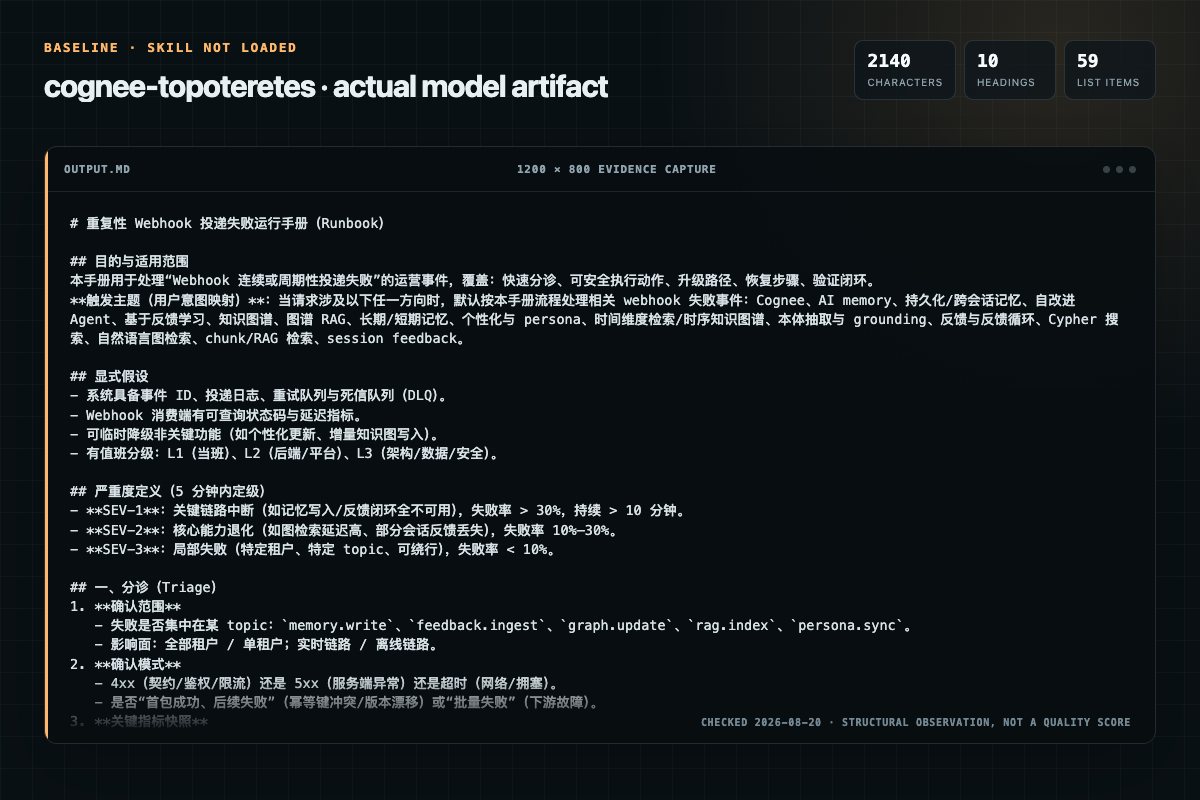
Baseline: 2140 non-whitespace characters, 10 headings, and 59 list items.
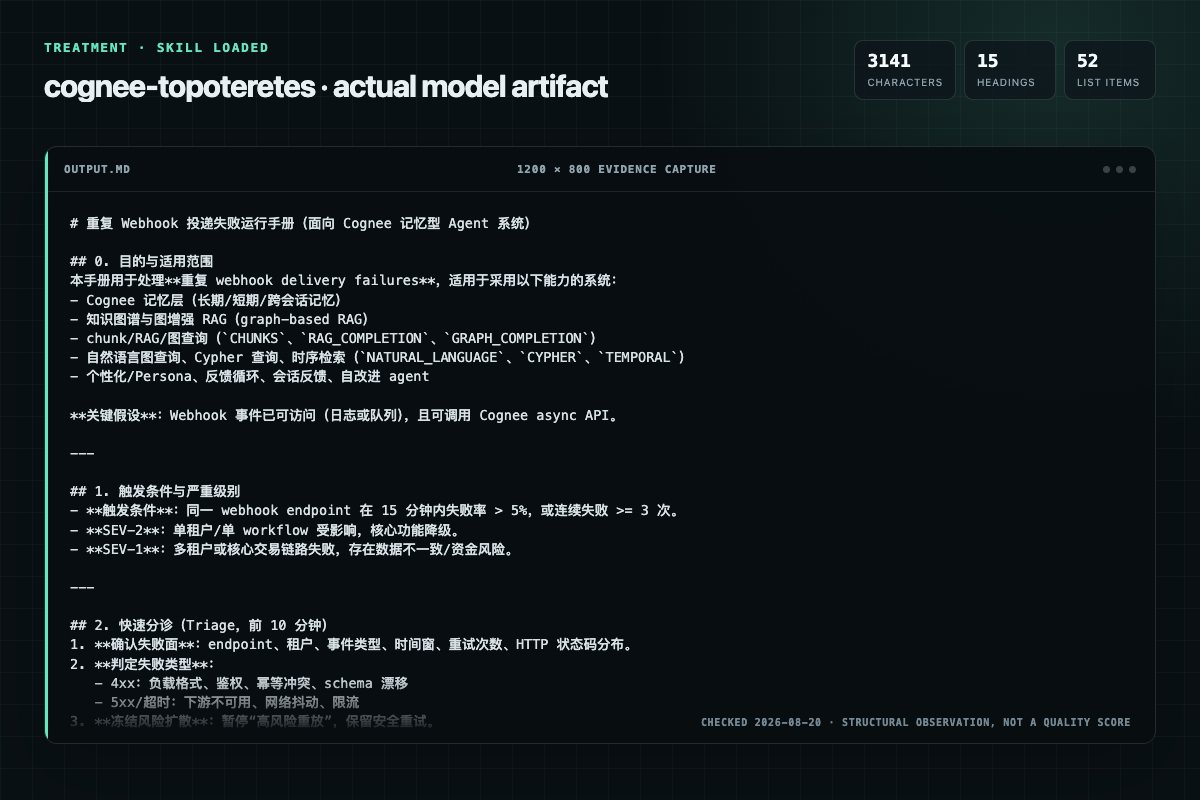
With Skill: 3141 non-whitespace characters, 15 headings, and 52 list items.
| Observation | Without Skill | With Skill |
|---|---|---|
| Source-signal coverage | 2/8: cognee, graph | 3/8: cognee, graph, search |
| Output structure | 2140 chars · 10 headings · 59 list items · 0 code blocks | 3141 chars · 15 headings · 52 list items · 6 code blocks |
| Verification and caution signals | 29 verification signals · 6 risk/limitation signals | 23 verification signals · 11 risk/limitation signals |
Use the cognee Skill pinned at fd5045f6b605 for my task. Follow its source-specific constraints around `cognee`, `apply`, `common`, `tasks`, then return the finished deliverable with explicit assumptions, verification, failure conditions, and limits. Do not treat the Skill text as a factual source or claim that a single demonstration proves universal performance.
Compatibility matrix
| Platform | Status | Evidence | What to check |
|---|---|---|---|
| Codex | Not declared | No explicit evidence | Portability before use |
| Claude Code | Not declared | No explicit evidence | Portability before use |
| Cursor | Not declared | No explicit evidence | Portability before use |
| Gemini CLI | Not declared | No explicit evidence | Portability before use |
Installation
The source command is displayed only when detected. A safe inspection prompt is always available so your agent can explain every action before execution.
npx skills add https://github.com/topoteretes/cognee --skill "cognee"Inspect the Agent Skill "cognee" from https://github.com/topoteretes/cognee/blob/690c0ec023719a2a277dc893cdecfec1ca8012cc/cognee/skill.md at commit 690c0ec023719a2a277dc893cdecfec1ca8012cc. List every install step, command, network request, credential, file read/write, external action, and rollback step. Explain whether it fits my task. Do not install or execute anything until I approve.
Workflow
Review the “Core workflow” section in the pinned source before continuing.
Apply this skill whenever the user wants to do any of the following with Cognee:
When helping with Cognee:
Use cognee.add(...) for text, files, URLs, or mixed inputs.
Use cognee.add(...) for text, files, URLs, or mixed inputs.
Permission review
The documentation includes network, browsing, or remote request actions.
await cognee.add("https://example.com", dataset_name="research")Evidence record
| Signal | Value | Evidence type | Meaning |
|---|---|---|---|
| Quality score | 92/100 | Computed | Documentation, specificity, maintenance, and trust rules |
| Repository stars | 30,242 | Source | Repository attention, not individual Skill quality |
| Compatibility | 0 platforms | Source | Declared in the catalog source record |
| Usage guide | tested outcome page | Tested | Generated or reviewed according to the visible evidence level |
Pinned source
Use this skill for Cognee-specific Python API help and for mapping user goals to the right Cognee workflow.
Apply this skill whenever the user wants to do any of the following with Cognee:
SearchTypememifyDataPoint typesnode_set / NodeSetsIf the user’s intent is “store information in memory and query it later,” prefer Cognee’s core flow: add -> cognify -> search
import cognee
from cognee import SearchType

await cognee.add(
    "Your text, file path, URL, or list of inputs",
    dataset_name="main",
    node_set=["default_memory"],
)
await cognee.cognify(datasets="main")
results = await cognee.search(
    "What are the key insights?",
    query_type=SearchType.GRAPH_COMPLETION,
    datasets="main",
)
When helping with Cognee:
add(...) to ingestcognify(...) to build the graphsearch(...) to query itdataset_name / datasets to keep work organized when the user has multiple sources.node_set when the user wants lightweight tagging, project scoping, per-user memory buckets, or subgraph filtering.memify(...) for enriching an existing graphtemporal_cognify=True for time-aware extractionDataPoint types for domain-specific extractionUse cognee.add(...) for text, files, URLs, or mixed inputs.
await cognee.add("notes.md", dataset_name="research")
await cognee.add("https://example.com", dataset_name="research")
await cognee.add(["paper.pdf", "summary.txt"], dataset_name="research")
Use node_set when the user wants data grouped into logical memory buckets.
await cognee.add(
    "Customer prefers concise weekly summaries and Slack delivery.",
    dataset_name="customer_success",
    node_set=["preferences", "customer_123", "weekly_reports"],
)
Use cognee.cognify(...) after ingestion.
await cognee.cognify(datasets="research")
Use these options when relevant:
await cognee.cognify(
    datasets="research",
    temporal_cognify=True,
    chunk_size=1024,
    custom_prompt="Extract companies, products, and partnerships.",
)
Use cognee.search(...) and pick the search mode that matches the request.
results = await cognee.search(
    "What changed in Q1 2024?",
    query_type=SearchType.TEMPORAL,
    datasets="research",
    top_k=10,
)
Use NodeSets when the user wants to search only a subset of memory such as one project, one customer, one user, or one workflow.
results = await cognee.search(
    query_text="What are this customer's reporting preferences?",
    query_type=SearchType.GRAPH_COMPLETION,
    datasets="customer_success",
    node_name=["preferences", "customer_123"],
)
Use memify(...) when the user wants to improve or extend an already-built graph without restarting the full workflow.
await cognee.memify(dataset="research")
Use custom models when the user wants extraction shaped around a schema.
from typing import Any
from pydantic import SkipValidation
from cognee.infrastructure.engine import DataPoint
from cognee.tasks.storage import add_data_points

class ScientificPaper(DataPoint):
    title: str
    authors: list[str]
    methodology: str
    findings: list[str]
    cites: SkipValidation[Any] = None
    metadata: dict = {"index_fields": ["title", "findings"]}

paper = ScientificPaper(
    title="Graph Memory for Agents",
    authors=["A. Researcher"],
    methodology="Knowledge graph + vector retrieval",
    findings=["Improved cross-session recall", "Better multi-hop retrieval"],
)

await add_data_points([paper])
Use run_custom_pipeline(...) when the user needs explicit sequential task control.
from cognee.modules.pipelines.tasks.task import Task

async def my_task(data):
    return data

await cognee.run_custom_pipeline(
    tasks=[Task(my_task)],
    data="input",
    dataset="research",
)
A DataPoint is the atomic unit of knowledge in Cognee.
Use this concept whenever the user asks how Cognee represents structured data internally or how to insert graph objects directly.
Key ideas:
DataPoint is a Pydantic model that represents one meaningful unit of information.metadata = {"index_fields": [...]} controls which fields should be embedded for semantic search.Use DataPoint when the user wants:
Prefer plain add(...) -> cognify(...) for unstructured documents.
Prefer DataPoint models plus add_data_points(...) when the user already has structured Python objects and wants direct graph insertion.
Use NodeSets when the user wants a lightweight way to tag, group, and scope memory.
A NodeSet starts as a simple list of tags passed through node_set=[...] during add(...), but after cognify() those tags become first-class graph nodes that help organize retrieval.
["customer_123"]["support_bot", "refund_flow"]["contracts", "vendor_risk"]["prod", "staging"]["user_42", "preferences"]await cognee.add(
[
"Alice prefers terse answers and email follow-ups.",
"Alice escalates billing issues to finance first.",
"Bob prefers detailed technical explanations."
],
dataset_name="agent_memory",
node_set=["crm", "user_profiles"],
)
await cognee.cognify(datasets="agent_memory")
results = await cognee.search(
query_text="How should I respond to Alice?",
datasets="agent_memory",
node_name=["crm", "user_profiles"],
)
Use NodeSets by default whenever the user says things like:
Use these defaults:
GRAPH_COMPLETION: best default for graph-aware Q&ARAG_COMPLETION: traditional RAG over document chunksCHUNKS: fast semantic retrieval without completionCHUNKS_LEXICAL: exact-term / keyword matchingSUMMARIES: overview of documentsTRIPLET_COMPLETION: subject-predicate-object style graph Q&AGRAPH_SUMMARY_COMPLETION: graph + summary-based answersGRAPH_COMPLETION_COT: deeper reasoning over graph contextGRAPH_COMPLETION_CONTEXT_EXTENSION: broader graph context retrievalCYPHER: raw Cypher queries when enabledNATURAL_LANGUAGE: natural language to graph queryTEMPORAL: time-aware graph searchCODING_RULES: code rules and patternsCODE: deterministic code fact lookup, graph traversal, paths, and impact analysisFEELING_LUCKY: let Cognee choose automaticallyFEEDBACK: apply feedback to improve later retrieval behaviorUse Cognee as the memory layer for agent systems that need to improve over time through better recall, better reuse of prior work, and better retrieval of successful past behavior.
The key idea is simple:
This means “improvement” comes from memory reuse and retrieval quality, not from changing the model or retraining it.
Cognee helps agent systems:
A strong way to explain Cognee in agent systems is:
Baseline condition The agent searches the existing knowledge graph and acts using only current stored knowledge.
Feedback-enabled condition The agent uses the same prompt and the same tools, but now benefits from:
Improvement mechanism Future runs become faster or better because the agent can retrieve:
This is best described as feedback-driven memory reuse, not fine-tuning.
Cognee fits naturally into a two-layer memory pattern:
Use sessionized search and cached interactions during active work.
This helps the agent retain recent context such as:
Use this when the user wants:
Periodically persist valuable sessions, interactions, or derived lessons back into the knowledge graph.
This lets future runs retrieve patterns such as:
Use this when the user wants:
Use these building blocks:
add(...) to store new observations, logs, outcomes, or factscognify(...) to turn them into searchable graph memorysearch(...) to retrieve relevant prior knowledge before actingsession_id to preserve continuity across related searchesmemify(...) to enrich or consolidate existing memory into higher-value graph knowledgedataset_name and node_set to scope memory to the right tenant, project, workflow, or userA reusable explanation for Cognee-powered agents is:
Observe Capture new inputs, events, user preferences, outcomes, errors, and decisions.
Store Add them to Cognee as raw text, documents, structured objects, or DataPoints.
Organize Use datasets and NodeSets to separate memory by customer, workflow, team, agent, or topic.
Build memory
Run cognify(...) so the information becomes graph-aware and searchable.
Recall before acting Search Cognee before planning, tool use, synthesis, or response generation.
Capture feedback Record what worked, what failed, what was helpful, and what should be reused.
Consolidate Periodically persist session history or derived lessons into long-term graph memory.
Reuse Future runs benefit from richer context and more informed retrieval.
A good generalized way to describe agent feedback is:
The agent does not change its core reasoning procedure. It improves because each run leaves behind better memory for the next run.
That memory can include:
Suggest Cognee when the user wants agents that:
import cognee
from cognee import SearchType

# 1) Store a new observation
await cognee.add(
    "Customer 123 prefers concise status updates and Slack notifications.",
    dataset_name="agent_memory",
    node_set=["customer_123", "preferences", "support_agent"],
)

# 2) Build memory
await cognee.cognify(datasets="agent_memory")

# 3) Recall before acting
context = await cognee.search(
    query_text="What should I know before replying to customer 123?",
    query_type=SearchType.GRAPH_COMPLETION,
    datasets="agent_memory",
    session_id="support-session-123",
)

# 4) Continue work in the same session
answer = await cognee.search(
    query_text="Draft the best reply for customer 123.",
    query_type=SearchType.GRAPH_COMPLETION,
    datasets="agent_memory",
    session_id="support-session-123",
)

# 5) Consolidate or enrich memory later
await cognee.memify(dataset="agent_memory")
If the user asks how Cognee helps agents improve over time, answer with this idea:
Cognee lets agents improve by remembering more useful things, organizing them into searchable graph memory, and reusing successful past work in future runs.
Use Cognee config helpers when the user needs provider or backend setup.
cognee.config.set_llm_provider("openai")
cognee.config.set_llm_model("gpt-4o-mini")
cognee.config.set_llm_api_key("sk-...")
Examples of related areas the user may ask about:
Use these when the user wants to inspect, clear, replace, or delete data.
datasets = await cognee.datasets.list_datasets()
await cognee.datasets.empty_dataset(dataset_id)
await cognee.datasets.delete_all()
await cognee.update(data_id="...", data="Updated content", dataset_id="...")
Use session_id when the user wants conversational continuity across searches.
results = await cognee.search(
    query_text="Continue the earlier analysis",
    datasets="agent_memory",
    session_id="analysis-session-1",
)
Use feedback when the user wants Cognee to reinforce useful retrieval behavior over time.
from cognee import SearchType

results = await cognee.search(
    query_text="What are the main themes in my data?",
    query_type=SearchType.GRAPH_COMPLETION,
    save_interaction=True,
)

await cognee.search(
    query_text="Helpful answer. It captured the key technical themes.",
    query_type=SearchType.FEEDBACK,
    last_k=1,
)
Use visualization when the user wants to inspect or present the graph.
visualize_graph renders a bounded subgraph by default (seed nodes + a
k-hop neighborhood, capped at max_nodes) instead of the whole graph.
# Default: bounded subgraph. Seed by a query, explicit ids, or a recall result;
# with none of those, the highest-degree nodes seed a representative view.
await cognee.visualize_graph("/path/to/output.html")
await cognee.visualize_graph("/path/to/output.html", query="What relates to Python?")
await cognee.visualize_graph("/path/to/output.html", seed_node_ids=["node-id-1"])
await cognee.visualize_graph("/path/to/output.html", recall_result=recall_output)

# Legacy whole-graph render.
await cognee.visualize_graph("/path/to/output.html", full=True)

await cognee.start_visualization_server(port=8080)
await cognee.start_ui()
Caps: neighborhood_depth=2, neighborhood_seed_top_k=10, max_nodes=500.
See examples/guides/graph_visualization.py.
Use pruning when the user wants to reset user data or backing stores.
await cognee.prune.prune_data()
await cognee.prune.prune_system(graph=True, vector=True, metadata=False, cache=True)
node_set early when the user may later need scoped retrieval.temporal_cognify=True for event-and-time extraction.session_id when the user wants session-aware interactions.memify(...) when the user wants to enrich an existing graph with derived facts or reusable rules.DataPoint types only when the user needs schema-shaped extraction.CYPHER only when Cypher querying is enabled in config.Do not jump straight to advanced backends, ontology configuration, or custom pipelines unless the user asks for them or the problem clearly requires them. Prefer the smallest correct Cognee solution first, then extend it.
Frequently asked questions
Use this skill for Cognee-specific Python API help and for mapping user goals to the right Cognee workflow.
The source record exposes this install command: npx skills add https://github.com/topoteretes/cognee --skill "cognee". Inspect the command and pinned source before running it.
Static rules flagged network in the source; the page lists the matching lines and excerpts.
Alternatives
garrytan/gbrain
End-to-end discipline for turning any large data source (audio libraries, email takeouts, document corpora, chat exports, API dumps) into brain pages at scale. The lifecycle spine: SCHEMA → ACCESS → TRIAL → EVALUATE → IMPROVE → CODIFY → TEST → SKILLIFY → BULK → MONITOR. State is tracked in a durable JSON manifest (see MANIFEST-PATTERN.md) so any crash, session boundary, or subagent fan-out resumes from ground truth instead of memory.
alirezarezvani/claude-skills
App Store Optimization (ASO) toolkit for researching keywords, analyzing competitor rankings, generating metadata suggestions, and improving app visibility on Apple App Store and Google Play Store. Use when the user asks about ASO, app store rankings, app metadata, app titles and descriptions, app store listings, app visibility, or mobile app marketing on iOS or Android. Supports keyword research and scoring, competitor keyword analysis, metadata optimization, A/B test planning, launch checklist
wanshuiyin/Auto-claude-code-research-in-sleep
Use it for operations and research tasks; the detail page covers purpose, installation, and practical steps.
prowler-cloud/prowler
PostgreSQL indexing best practices for Prowler: index design, partial indexes, partitioned table indexing, EXPLAIN ANALYZE validation, concurrent operations, monitoring, and maintenance. Trigger: When creating or modifying PostgreSQL indexes, analyzing query performance with EXPLAIN, debugging slow queries, reviewing index usage statistics, reindexing, dropping indexes, or working with partitioned table indexes. Also trigger when discussing index strategies, partial indexes, or index maintenance