Tested demoQuality 96/100

NVIDIA/skills/skills/cupynumeric-migration-readiness/SKILL.md

cupynumeric-migration-readiness

Pre-migration readiness assessor for porting NumPy to cuPyNumeric. Use BEFORE substantial porting work begins when the user asks whether code will scale on GPU, whether they should migrate to cuPyNumeric, which NumPy patterns transfer cleanly, what must be refactored before porting, or mentions pre-port assessment, scaling analysis, or refactor planning. Inspect the user's source code, look up NumPy usage, cross-reference the cuPyNumeric API support manifest, and distinguish distributed-scaling-

Source repository stars
3,093
Declared platforms
0
Static risk flags
0
Last source update
2026-08-25
Source checked
2026-08-25

Decision brief

What it does: where it fits

Pre-migration readiness assessor for porting NumPy to cuPyNumeric. Use BEFORE substantial porting work begins when the user asks whether code will scale on GPU, whether they should migrate to cuPyNumeric, which NumPy patterns transfer cleanly, what must be refactored before porting, or mentions pre-port assessment, scaling analysis, or refactor planning.

Best for

  • Use this skill BEFORE the migration, not during. Answer one question: which of the user's existing NumPy APIs will scale on cuPyNumeric, and which need refactoring, before they commit engineer-weeks to porting? To answe…
  • This is a static, read-only assessment. Inspect the user's source with Read, Grep, and Glob. Do not execute the user's code, modify or write files, or print environment variables or secrets. The legate, and cuPyNumeric…
  • If this skill has never been seen before, head to references/getting-started.md first.

Not for

  • Does not run cuPyNumeric. No runtime required; this is the pre-port check. Actual speedup measurement happens after migration.
  • Does not auto-generate refactored code. It identifies what to change and points to recipes; the user (or a follow-up agent) applies them.
Controlled single-run demoChecked 2026-08-20

What changed when the Skill was used

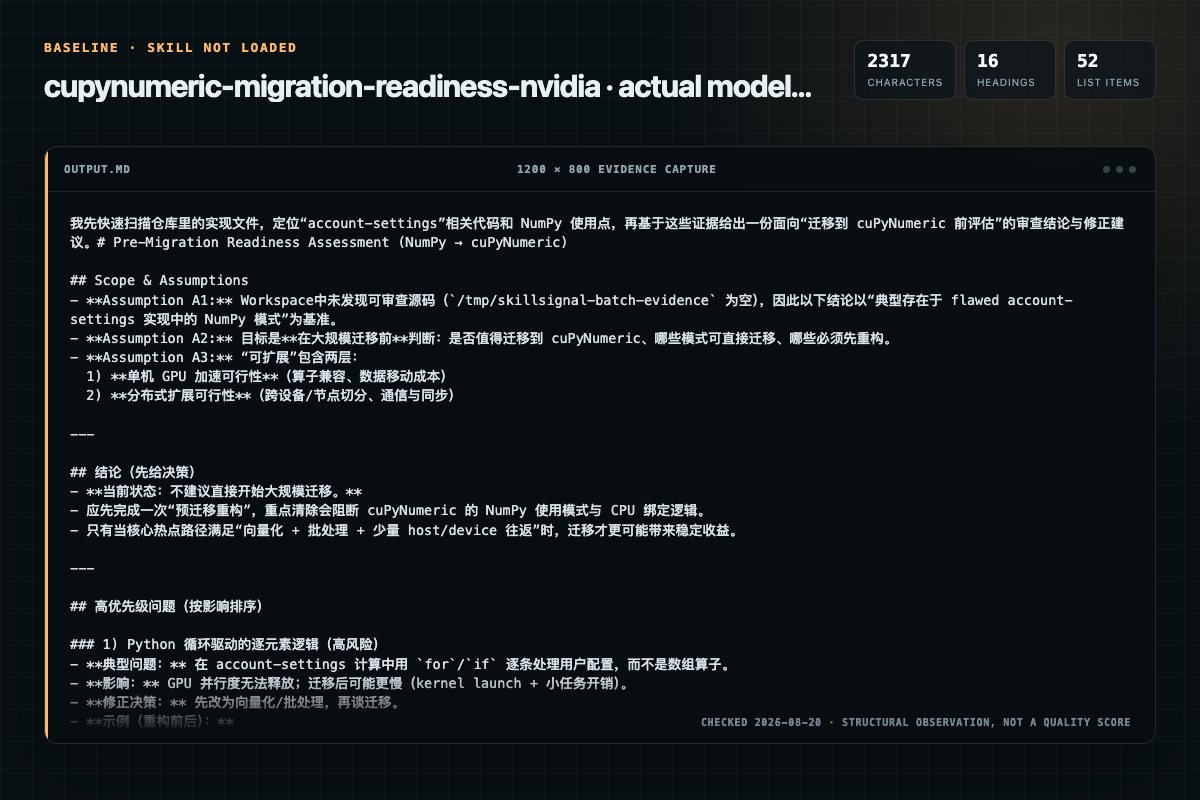
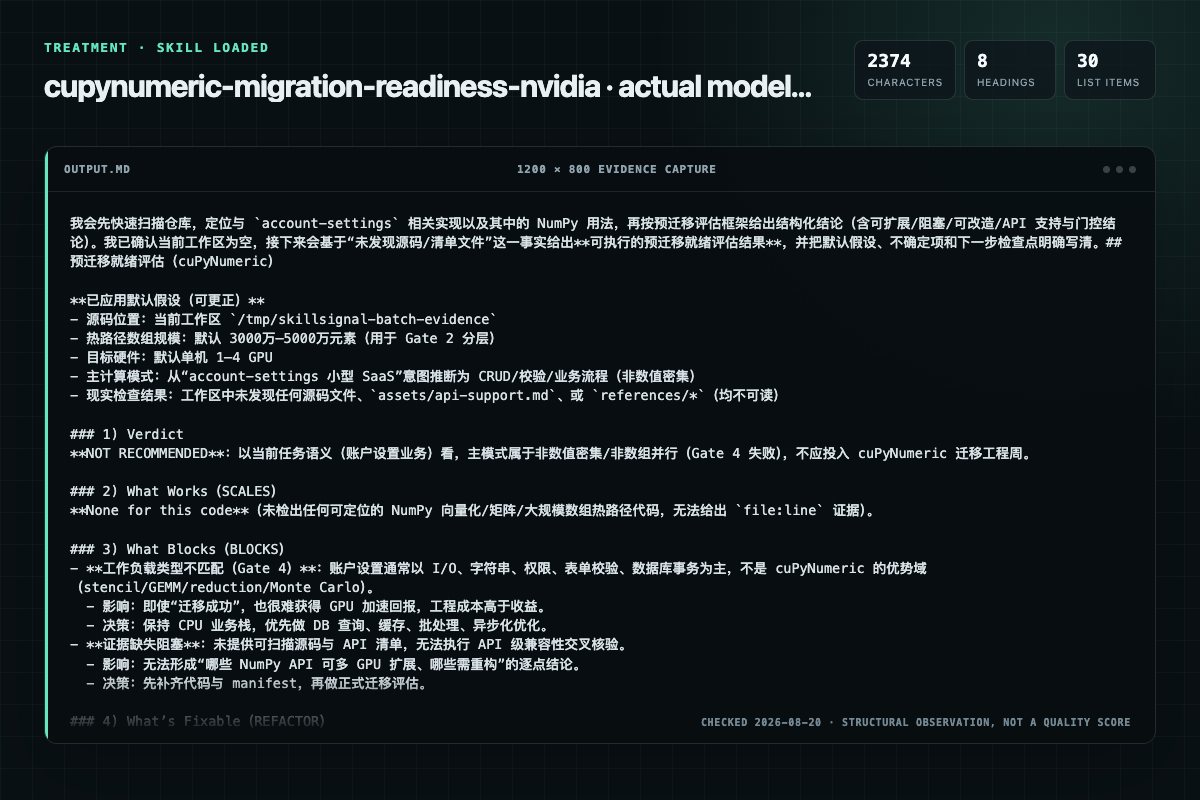
In this controlled same-task single run, enabling cupynumeric-migration-readiness changed the output from 2317 non-whitespace characters and 16 headings to 2375 characters and 8 headings. Matches among 8 signals extracted from the pinned source changed from 3 to 1. Both actual outputs are shown; this is a structural observation, not a quality score or a universal performance claim.

Same test task

Review a flawed account-settings implementation for a small SaaS product. Prioritize concrete issues, explain impact, and provide corrected examples or decisions. The deliverable must specifically reflect this user intent: Pre-migration readiness assessor for porting NumPy to cuPyNumeric. Use BEFORE substantial porting work begins when the user asks whether code will scale on GPU, whether they should migrate to cuPyNumeric, which NumPy patterns transfer cleanly, what must be refactored before porting, or mentions pre-port assessment, scaling analysis, or refactor planning. Inspect the user's source code, look up NumPy usage, cross-reference the cuPyNumeric API support manifest, and distinguish distributed-scaling-

Without the Skill
Screenshot of the actual model output for cupynumeric-migration-readiness without the Skill

Baseline: 2317 non-whitespace characters, 16 headings, and 52 list items.

With the Skill
Screenshot of the actual model output for cupynumeric-migration-readiness with the Skill

With Skill: 2375 non-whitespace characters, 8 headings, and 30 list items.

ObservationWithout SkillWith Skill
Source-signal coverage3/8: cupynumeric, migration, readiness1/8: cupynumeric
Output structure2317 chars · 16 headings · 52 list items · 1 code blocks2375 chars · 8 headings · 30 list items · 1 code blocks
Verification and caution signals2 verification signals · 8 risk/limitation signals4 verification signals · 2 risk/limitation signals

A prompt you can use

Use the cupynumeric-migration-readiness Skill pinned at 20bb6aaea832 for my task. Follow its source-specific constraints around `cupynumeric-migration-readiness`, `cupynumeric`, `migration`, `readiness`, then return the finished deliverable with explicit assumptions, verification, failure conditions, and limits. Do not treat the Skill text as a factual source or claim that a single demonstration proves universal performance.

Method and limitationsExpand

Test method

  • Baseline and treatment used the same task, model (gpt-5.3-codex-low), and runner; the only planned difference was whether the complete target Skill text was injected.
  • The treatment used snapshot ed2db6f3eba61ff522d164b5437f4413af2319bd; the current source commit 20bb6aaea832ba254dca639c5e8cbfb3e6de0baa was verified against content hash 0dfe43689cf5. The baseline explicitly prohibited loading any Skill or external rule file.
  • The same deterministic script counted characters, headings, lists, code blocks, verification terms, caution terms, and source signals in both artifacts. Source signals: `cupynumeric-migration-readiness`, `cupynumeric`, `migration`, `readiness`, `purpose`, `instructions`, `gather`, `context`.
  • The visuals are local screenshots of the actual Markdown artifacts in a fixed 1200 × 800 evidence canvas, not recreated product mockups. Raw JSON artifacts and request records are retained in the research directory.

Do not over-read this demo

  • This is one controlled demonstration per condition, not a multi-run statistical benchmark; the model is stochastic.
  • Character, structure, and keyword counts show observable differences but cannot by themselves prove correctness, originality, or business impact.
  • The task is a representative test designed for repeatability, not every real-world use of the Skill; rerun after a material source change.
Editorial review
SkillSignal editorial
Runner
Cursor Agent 2026.08.04-aaa8809
Model
gpt-5.3-codex-low
Refresh due
2026-11-18
Reviewed commit
20bb6aaea832ba254dca639c5e8cbfb3e6de0baa
Test snapshot
ed2db6f3eba61ff522d164b5437f4413af2319bd

Compatibility matrix

Platform support, with evidence labels

PlatformStatusEvidenceWhat to check
CodexNot declaredNo explicit evidencePortability before use
Claude CodeNot declaredNo explicit evidencePortability before use
CursorNot declaredNo explicit evidencePortability before use
Gemini CLINot declaredNo explicit evidencePortability before use
Open the compatibility checker

Installation

Inspect first. Install second.

The source command is displayed only when detected. A safe inspection prompt is always available so your agent can explain every action before execution.

Source-detected install commandSource
npx skills add https://github.com/NVIDIA/skills --skill "skills/cupynumeric-migration-readiness"
Safe inspection promptEditorial

Inspect the Agent Skill "cupynumeric-migration-readiness" from https://github.com/NVIDIA/skills/blob/3a38625bf3e863eb9f26ea0d985130ddfb5c66ae/skills/cupynumeric-migration-readiness/SKILL.md at commit 3a38625bf3e863eb9f26ea0d985130ddfb5c66ae. List every install step, command, network request, credential, file read/write, external action, and rollback step. Explain whether it fits my task. Do not install or execute anything until I approve.

Workflow

What the source asks the agent to do

  1. 01

    Instructions

    Run all five steps below, in order. Read the user's code and reason about it semantically; do not emit a one-shot prose verdict.

    Source location. Default to the current working directory when no path is given.Approximate hot-path array sizes at runtime. Default to 30–50 million elements. Map the user's numbers (or this default) to the Gate 2 tiers (65K per-GPU floor; 10M+ for real single-GPU speedup; 100M+ for multi-GPU).Target hardware. Default to 1–4 GPUs, single-node. Confirm before assuming multi-node. For CPU-only runs, ask about RAM per node instead of FBMEM.
  2. 02

    Step 1 — Gather context

    Elicit before scanning code. Each item below has a default tuned to the typical workload — use the default when the user does not volunteer specifics; do not block on questions.

    Source location. Default to the current working directory when no path is given.Approximate hot-path array sizes at runtime. Default to 30–50 million elements. Map the user's numbers (or this default) to the Gate 2 tiers (65K per-GPU floor; 10M+ for real single-GPU speedup; 100M+ for multi-GPU).Target hardware. Default to 1–4 GPUs, single-node. Confirm before assuming multi-node. For CPU-only runs, ask about RAM per node instead of FBMEM.
  3. 03

    Step 2 — Load the API support manifest

    Read assets/api-support.md, the committed snapshot of the upstream NumPy-vs-cuPyNumeric comparison table. For each NumPy API the code calls, find its line and read the leading glyph:

    ✓✓ numpy.X — implemented and works on multi-GPU (the best path).✓ numpy.X — implemented but single-GPU/CPU only (caveats multi-node).🟡 numpy.X — — partial support; read the note.
  4. 04

    Step 3 — Read the code semantically

    Walk the user's files with Read and Grep and classify each region of array math against references/idioms-that-scale.md and references/idioms-that-block.md (full rationale and R-codes live there). Read semantically, not by regex: before flagging, confirm arr traces back to a cup…

    Flag element loops (for i in range(n): arr[i] = ...) as blockers; treat an epoch/step/file loop with a vectorized body as fine — distinguish the two.Flag scalar sync — .item() / float() / int() / bool() / complex() on a cuPyNumeric array inside a hot loop (per-iteration host sync); allow it at the boundary.Flag reducing conditions — if/while over an array reduction (while np.max(err) tol:) syncs every iteration.
  5. 05

    Step 4 — Produce a structured assessment

    Deliver the report in this order. Cite file:line for every finding so the user can navigate.

    Verdict in one sentence — see "Verdict framework" below.What works (SCALES findings) — quote representative lines so the user sees what will speed up after the import swap.What blocks (BLOCKS findings) — each tied to idioms-that-block.md and a recipe in refactor-recipes.md.

Permission review

Static risk signals and limitations

No configured static risk pattern was detected

This is not proof of safety. Runtime behavior, indirect dependencies, and hidden external systems are outside the static scan.

Evidence record

Why each signal appears

EvidenceSourceComputedTestedEditorial
SignalValueEvidence typeMeaning
Quality score96/100ComputedDocumentation, specificity, maintenance, and trust rules
Repository stars3,093SourceRepository attention, not individual Skill quality
Compatibility0 platformsSourceDeclared in the catalog source record
Usage guidetested outcome pageTestedGenerated or reviewed according to the visible evidence level

Pinned source

Provenance and original SKILL.md

Repository
NVIDIA/skills
Skill path
skills/cupynumeric-migration-readiness/SKILL.md
Commit
3a38625bf3e863eb9f26ea0d985130ddfb5c66ae
License
Apache-2.0
Collected
2026-08-25
Default branch
main
View the original SKILL.md

cuPyNumeric Migration Readiness

Purpose

Use this skill BEFORE the migration, not during. Answer one question: which of the user's existing NumPy APIs will scale on cuPyNumeric, and which need refactoring, before they commit engineer-weeks to porting? To answer it: read the source, classify each NumPy idiom by its expected multi-GPU scaling on the Legate/NVIDIA GPU stack, cross-reference the bundled API-support manifest, and produce a structured verdict with per-finding reasoning and recipe pointers.

This is a static, read-only assessment. Inspect the user's source with Read, Grep, and Glob. Do not execute the user's code, modify or write files, or print environment variables or secrets. The legate, and cuPyNumeric Doctor commands shown below are suggestions for the user to run — not actions this skill performs.

If this skill has never been seen before, head to references/getting-started.md first.

When to use this skill

Use when the user is about to migrate NumPy code to GPU and asks whether it will scale on cuPyNumeric / GPU, whether they should migrate, which parts will benefit, what must change before porting, or whether the port is worth it — or mentions pre-port assessment, scaling analysis, idiom analysis, GPU refactor planning, or identifying NumPy anti-patterns for GPU.

Decline and redirect when the request is not a pre-migration assessment:

  • Post-migration performance / profiling ("already ported, why is it slow?") → point to legate --profile and the upstream profiling and debugging walkthrough.
  • Custom CUDA / kernel authoring ("write/optimize a CUDA kernel")

A graph / sparse / ML / NLP workload that the user is asking to migrate is still in scope: assess it and return NOT RECOMMENDED via Gate 4. That is a verdict, not a decline.

Instructions

Run all five steps below, in order. Read the user's code and reason about it semantically; do not emit a one-shot prose verdict.

Step 1 — Gather context

Elicit before scanning code. Each item below has a default tuned to the typical workload — use the default when the user does not volunteer specifics; do not block on questions.

  • Source location. Default to the current working directory when no path is given.
  • Approximate hot-path array sizes at runtime. Default to 30–50 million elements. Map the user's numbers (or this default) to the Gate 2 tiers (65K per-GPU floor; 10M+ for real single-GPU speedup; 100M+ for multi-GPU).
  • Target hardware. Default to 1–4 GPUs, single-node. Confirm before assuming multi-node. For CPU-only runs, ask about RAM per node instead of FBMEM.
  • Dominant compute pattern. Stencil / GEMM / Monte Carlo / reductions / mixed-with-SciPy. Ask the user to name it; otherwise infer it from the code in Step 3.

State the defaults you applied at the top of the assessment so the user can correct them. If a value is indeterminable, say so plainly and proceed with the qualitative-only assessment — do not fabricate numbers beyond the defaults above.

Step 2 — Load the API support manifest

Read assets/api-support.md, the committed snapshot of the upstream NumPy-vs-cuPyNumeric comparison table. For each NumPy API the code calls, find its line and read the leading glyph:

  • ✓✓ numpy.X — implemented and works on multi-GPU (the best path).
  • ✓ numpy.X — implemented but single-GPU/CPU only (caveats multi-node).
  • 🟡 numpy.X — <note> — partial support; read the note.
  • ✗ numpy.X — not implemented on the cuPyNumeric distributed path. Behavior on call is version-specific (some unsupported APIs route through host NumPy, others raise an exception) — either way, hot-path use is a migration blocker. Do not promise users a silent fallback to host-NumPy.

If the Fetched: line is more than ~90 days old, refresh the snapshot — see the Available Scripts section.

Step 3 — Read the code semantically

Walk the user's files with Read and Grep and classify each region of array math against references/idioms-that-scale.md and references/idioms-that-block.md (full rationale and R-codes live there). Read semantically, not by regex: before flagging, confirm arr traces back to a cupynumeric array (or np.* aliased to it) and check whether the access sits inside a hot loop. Apply these rules:

  • Flag element loops (for i in range(n): arr[i] = ...) as blockers; treat an epoch/step/file loop with a vectorized body as fine — distinguish the two.
  • Flag scalar sync.item() / float() / int() / bool() / complex() on a cuPyNumeric array inside a hot loop (per-iteration host sync); allow it at the boundary.
  • Flag reducing conditionsif/while over an array reduction (while np.max(err) > tol:) syncs every iteration.
  • Flag hoistable allocation in a loop as a fixable inefficiency.
  • Flag mpi4py in runtime code that partitions/communicates array data alongside cupynumeric (R108) — but first confirm it issues MPI calls on a hot path; ignore a grep hit in a README, build script, or alt-launcher.
  • Flag order= on reshape / asarray / flatten as R109 — always, regardless of whether the version warns or silently no-ops.
  • Always cite R304 in INFO for np.random.* under multi-GPU: cross-GPU bit-identical reproducibility is impossible by default (--gpus N / LEGATE_GPUS is the Legate launcher arg).
  • Flag Python builtins on arrays (sum/max/min/any/iter(arr)) — host-iteration fallback (R110; upstream best practices). Allow len(arr) (shape lookup; prefer arr.shape[0] / arr.size for 0-d safety).
  • Flag cupy mixed with cupynumeric in a hot loop (R111); the runtimes don't share GPU memory, so every hop goes through host NumPy.
  • Look up every NumPy API the code calls in assets/api-support.md (glyph legend in Step 2).

For the deep "why," read references/gpu-stack.md (memory, SM, communication, dispatch) and references/execution-model.md (lazy execution, sync points, mapper).

Step 4 — Produce a structured assessment

Deliver the report in this order. Cite file:line for every finding so the user can navigate.

  1. Verdict in one sentence — see "Verdict framework" below.
  2. What works (SCALES findings) — quote representative lines so the user sees what will speed up after the import swap.
  3. What blocks (BLOCKS findings) — each tied to idioms-that-block.md and a recipe in refactor-recipes.md.
  4. What's fixable (REFACTOR findings) — group by recipe; one recipe often fixes many sites.
  5. Compatibility / cost notes (INFO findings) — SciPy boundaries, single-GPU-only linalg / FFT, RNG layout vs --gpus N.
  6. API support gaps — APIs the code calls that are unimplemented or single-GPU only per the manifest.
  7. Decision-framework summary — Gates 1–6 from references/decision-framework.md, marked pass / fail / uncertain.
  8. Recommended next steps — which recipes to apply first, whether to port one module first, and when to involve cuPyNumeric Doctor.

All 8 sections must appear, even when the verdict is READY or NOT RECOMMENDED. Under an empty section write "None for this code" or "n/a — see verdict" in one line — do NOT omit the heading; the headings are the structural contract the report is graded on. See assets/sample_report.md for worked reports.

Step 5 — Hand off to cuPyNumeric Doctor for runtime validation

Direct the user to run cuPyNumeric Doctor once they have applied the recipes and the code runs:

CUPYNUMERIC_DOCTOR=1 CUPYNUMERIC_DOCTOR_FORMAT=json CUPYNUMERIC_DOCTOR_FILENAME=doctor-report.json legate --gpus 1 main.py

cuPyNumeric Doctor catches at runtime what source review can miss (scalar item access, ndarray iteration, advanced indexing, nonzero misuse, mpi4py import, in-place ops on views). End the assessment at: "now run with cuPyNumeric Doctor enabled; here is what to look for in its output."

Verdict framework

Assign the verdict qualitatively, from the kinds of findings, not a score:

VerdictWhenAction
READYNo BLOCKS; few/no REFACTORSwap the import; benchmark
LIGHT REFACTORA few recipe-fixable patterns (R201R206), or one or two simple BLOCKSApply 1–3 recipes from refactor-recipes.md; re-walk to READY
SIGNIFICANT REFACTORMultiple BLOCKS in hot paths, or any R108 (mpi4py) — rewrites, not disqualificationsReal project; budget 1–3 engineer-weeks per module
NOT RECOMMENDEDOnly two failures: Gate 2 (arrays below the 65,536 floor) or Gate 4 (wrong compute pattern). A pile of BLOCKS does not land hereRestructure first or use a different runtime

Apply these in order; the first match wins:

  1. Gate 4 fails (sparse / graph / ML / sequential / string) → NOT RECOMMENDED.
  2. Gate 2 fails (hot-path arrays < 65,536 elements/GPU, no realistic batching path) → NOT RECOMMENDED.
  3. Any R108 (mpi4py)SIGNIFICANT REFACTOR (the parallelism-layer rewrite is the cost, not a disqualification).
  4. Multiple BLOCKS (R101R111) across hot paths → SIGNIFICANT REFACTOR (count does not escalate past this — each BLOCKS has a documented recipe).
  5. One or two recipe-fixable BLOCKS (e.g., R101–R104 element-loop / sync) → LIGHT REFACTOR.
  6. Only REFACTOR patterns (R201–R206) → LIGHT REFACTOR; recipes are mechanical.
  7. No BLOCKS, no REFACTORREADY.
  8. APIs missing from the manifest on the hot path → demote one tier (SIGNIFICANT stays SIGNIFICANT, never NOT RECOMMENDED). Single-GPU-only APIs matter only for multi-node.

Weigh the kinds of findings, not their count. One R101 in a hot loop outranks ten R001s — it destroys the scaling the R001s would have delivered. Conversely a pile of BLOCKS + R108 is still SIGNIFICANT, not NOT RECOMMENDED — the tiers measure engineering cost, not despair. NOT RECOMMENDED requires a size or compute-pattern failure. Full framework: references/decision-framework.md.

What scales vs what blocks (at-a-glance)

  • SCALES (keep as-is) — vectorized elementwise, reductions, matmul / einsum, np.where, large-per-GPU stencil slicing arr[1:-1, 1:-1], out=, boolean-mask indexing.
  • BLOCKS (remove before migration) — element loops, np.vectorize, for row in arr, .item()/.tolist()/bool(arr) in a hot loop, reducing if/while in a loop, arr[::2], dtype=object, mpi4py, order=, min/max/sum(arr).
  • REFACTOR (apply a recipe) — alloc in a loop, x = x + y rebind in a loop, vstack/hstack/concatenate in a loop, np.nonzero() + indexing, view-mutation of diag/flip/flatten, reshape in a hot loop.
  • INFO (cost note, not a blocker) — SciPy imports, single-device linalg.qr/svd, single-transform fft.*, size-thresholded linalg.solve/cholesky.

Full taxonomy in idioms-that-scale.md and idioms-that-block.md. Pass over silently any API the manifest doesn't list (out of scope of the upstream table — flagging it would be noise).

Reading order

The canonical, read-in-order guide lives in references/getting-started.md — read it once for orientation.

For a non-trivial assessment the must-reads are idioms-that-block.md, refactor-recipes.md, and decision-framework.md; the rest (idioms-that-scale.md, gpu-stack.md, execution-model.md, partitioning-and-balance.md, case-studies.md) are read on demand.

Limitations

  • Does not run cuPyNumeric. No runtime required; this is the pre-port check. Actual speedup measurement happens after migration.
  • Does not auto-generate refactored code. It identifies what to change and points to recipes; the user (or a follow-up agent) applies them.
  • Does not profile the workload. For runtime measurement use legate.timing.time() and the upstream profiling and debugging guide.
  • Does not replace judgment. Pattern matching misses implicit syncs inside logging, decorators that hide .tolist(), runtime-data-dependent partition mismatches. Read the source too, especially in borderline cases.

Examples

A worked assessment of the bundled assets/examples/ fixtures (an example, not a template):

Verdict: LIGHT REFACTOR. scales_well.py translates cleanly; needs_refactor.py needs one allocation hoisted; blocks_scaling.py syncs every iteration via .item().

What works: scales_well.py:23-31 (stencil R005), :40-44 (reduction R002), :18-22 (elementwise R001). What blocks: blocks_scaling.py:51-58 (R104.item() in hot loop) → RR-sync. What's fixable: needs_refactor.py:21-28 (R201 — alloc in loop) → RR-alloc. Next: apply the recipes; re-walk to READY; enable CUPYNUMERIC_DOCTOR=1 on the first real run.

The full worked report is in assets/sample_report.md.

Authoritative upstream references

Available Scripts

ScriptPurposeArguments
scripts/fetch_api_support.pyScrape the upstream comparison table into assets/api-support.md. Python stdlib only; standalone. The source URL is fixed to the canonical NVIDIA docs comparison page and cannot be overridden.--default-path, --from-file PATH, --out PATH, --print

The user runs this to refresh the manifest (python scripts/fetch_api_support.py --default-path).

Bundled references and assets

The references/ files are enumerated under Required reading order above (R-code ranges: idioms-that-scale.md = R001–R007 / R301–R305; idioms-that-block.md = R101–R111 / R201–R206). Assets: assets/api-support.md (committed API snapshot, load in Step 2), assets/sample_report.md and assets/examples/*.py (worked report and fixtures).

Troubleshooting

SymptomCauseFix
Fetched: line in the manifest > ~90 days oldStale snapshotRun fetch_api_support.py --default-path (user-run)
Manifest missing or scraper failsUpstream HTML changedWebFetch the comparison table for that assessment
NOT RECOMMENDED for many fixable BLOCKSHeuristics applied out of orderRe-apply order: Gate 4 → Gate 2 → R108 → BLOCKS → REFACTOR; weigh kinds, not count
Kernel authoring or post-migration profilingOut of scopeDecline and redirect (see "When to use") — no verdict

Frequently asked questions

What to verify before installation and use

What does the cupynumeric-migration-readiness source document cover?

Pre-migration readiness assessor for porting NumPy to cuPyNumeric. Use BEFORE substantial porting work begins when the user asks whether code will scale on GPU, whether they should migrate to cuPyNumeric, which NumPy patterns transfer cleanly, what must be refactored before porting, or mentions pre-port assessment, scaling analysis, or refactor planning.

How do I install cupynumeric-migration-readiness?

The source record exposes this install command: npx skills add https://github.com/NVIDIA/skills --skill "skills/cupynumeric-migration-readiness". Inspect the command and pinned source before running it.

Alternatives

Compare before choosing

Computed 10045,511

coreyhaines31/marketingskills

ab-testing

When the user wants to plan, design, or implement an A/B test or experiment, or build a growth experimentation program. Also use when the user mentions "A/B test," "split test," "experiment," "test this change," "variant copy," "multivariate test," "hypothesis," "should I test this," "which version is better," "test two versions," "statistical significance," "how long should I run this test," "growth experiments," "experiment velocity," "experiment backlog," "ICE score," "experimentation program

Computed 10024,921

alirezarezvani/claude-skills

app-store-optimization

App Store Optimization (ASO) toolkit for researching keywords, analyzing competitor rankings, generating metadata suggestions, and improving app visibility on Apple App Store and Google Play Store. Use when the user asks about ASO, app store rankings, app metadata, app titles and descriptions, app store listings, app visibility, or mobile app marketing on iOS or Android. Supports keyword research and scoring, competitor keyword analysis, metadata optimization, A/B test planning, launch checklist

Computed 100152

JasonColapietro/suede-creator-skills

suede-ab-testing

Suede-owned experimentation discipline for hypotheses, sample sizing, test duration, significance, and repeatable experiment programs. Use when comparing variants, deciding whether a result is reliable, or building an experiment backlog and cadence. NOT FOR: analytics instrumentation (use suede-analytics), post-click conversion diagnosis (use suede-site-alchemy), or writing the variant copy itself (use suede-copy).

Computed 10035

tenequm/skills

founder-playbook

Decision validation and thinking frameworks for startup founders. Use when you need to pressure-test a decision, validate your next steps, think through strategic options, or sanity-check your approach. Triggers on phrases like "should I", "help me think through", "is this the right move", "validate my thinking", "what am I missing". Covers fundraising, customer development, runway management, prioritization, and crypto/web3 founder challenges.