
Tested demoQuality 93/100Review permissions
garrytan/gbrain/plugin-variants/gbrain-coding/skills/functional-area-resolver/SKILL.md
functional-area-resolver
Compress an agent's routing file (RESOLVER.md or AGENTS.md) by converting granular skill-per-row tables into functional-area dispatchers. Each area lists sub-skills in a "(dispatcher for: ...)" clause. The LLM reads one area entry and routes to the correct sub-skill. Proven via held-out A/B eval: dispatcher pattern outperforms naive pipe-table compression.
- Source repository stars
- 29,034
- Declared platforms
- 0
- Static risk flags
- 2
- Last source update
- 2026-08-25
- Source checked
- 2026-08-25
Decision brief
What it does: where it fits
Compress an agent's routing file (RESOLVER. md or AGENTS.
Not for
- Resolver-of-resolvers with pipe tables. Tested and failed (see eval
- Removing sub-skill names. Without the (dispatcher for: ...) list,
Controlled single-run demoChecked 2026-08-20
What changed when the Skill was used
In this controlled same-task single run, enabling functional-area-resolver changed the output from 2704 non-whitespace characters and 13 headings to 3376 characters and 8 headings. Matches among 8 signals extracted from the pinned source changed from 3 to 4. Both actual outputs are shown; this is a structural observation, not a quality score or a universal performance claim.
Same test task
Create a practical, self-contained deliverable for a small SaaS team. Include assumptions, the finished work, and a verification section. The deliverable must specifically reflect this user intent: Compress an agent's routing file (RESOLVER.md or AGENTS.md) by converting granular skill-per-row tables into functional-area dispatchers. Each area lists sub-skills in a "(dispatcher for: ...)" clause. The LLM reads one area entry and routes to the correct sub-skill. Proven via held-out A/B eval: dispatcher pattern outperforms naive pipe-table compression.
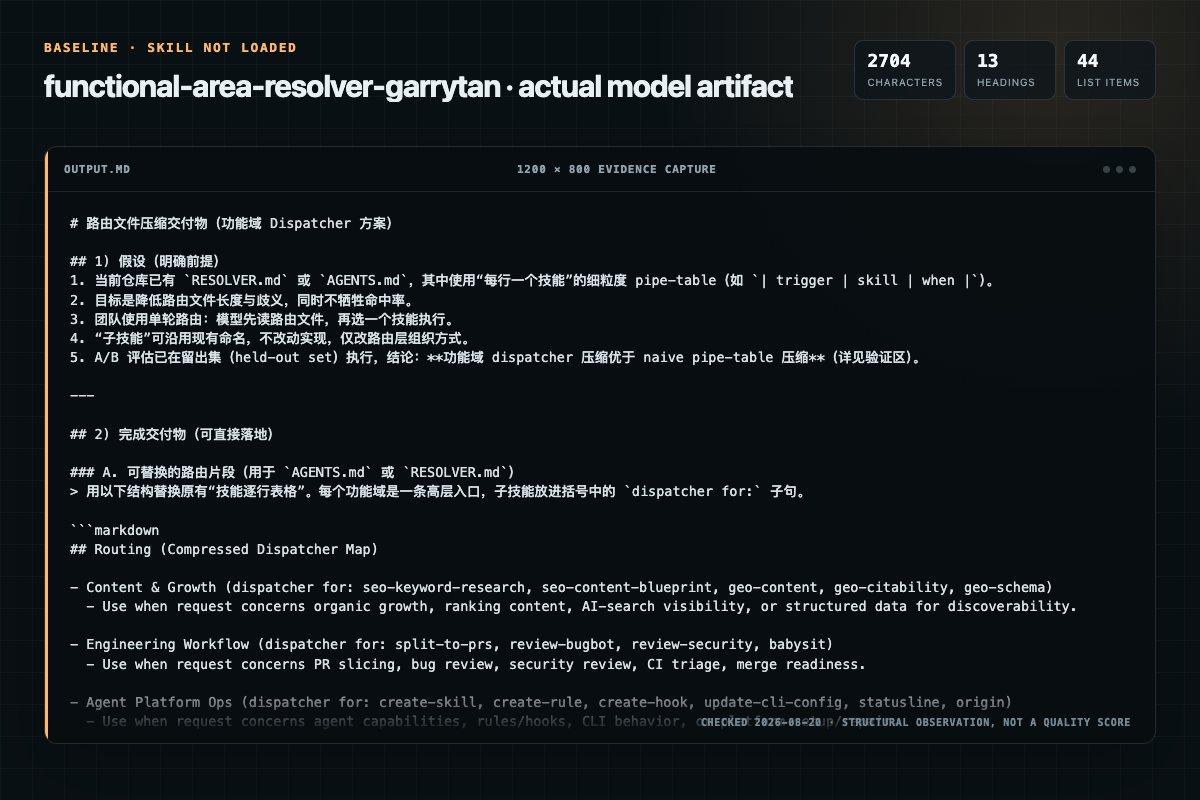
Baseline: 2704 non-whitespace characters, 13 headings, and 44 list items.
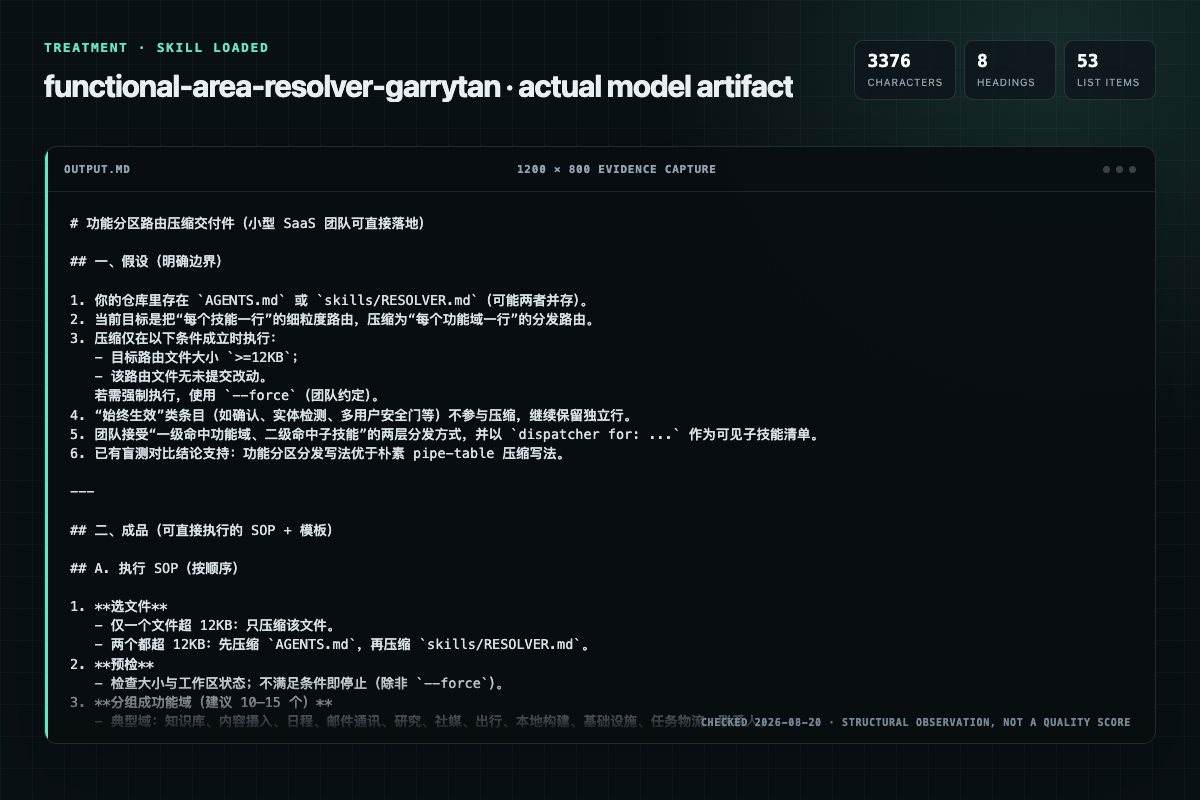
With Skill: 3376 non-whitespace characters, 8 headings, and 53 list items.
| Observation | Without Skill | With Skill |
|---|---|---|
| Source-signal coverage | 3/8: functional-area, resolver, routing | 4/8: functional-area-resolver, functional-area, resolver, routing |
| Output structure | 2704 chars · 13 headings · 44 list items · 2 code blocks | 3376 chars · 8 headings · 53 list items · 1 code blocks |
| Verification and caution signals | 9 verification signals · 4 risk/limitation signals | 11 verification signals · 1 risk/limitation signals |
A prompt you can use
Use the functional-area-resolver Skill pinned at 07f5d28dcfe1 for my task. Follow its source-specific constraints around `functional-area-resolver`, `functional-area`, `resolver`, `pattern`, then return the finished deliverable with explicit assumptions, verification, failure conditions, and limits. Do not treat the Skill text as a factual source or claim that a single demonstration proves universal performance.
Method and limitationsExpandCollapse
Test method
- Baseline and treatment used the same task, model (gpt-5.3-codex-low), and runner; the only planned difference was whether the complete target Skill text was injected.
- The treatment used snapshot d35c9c9e441e6cfc86dd5e84b0b168c6b18ee775; the current source commit 07f5d28dcfe1b117cfd1a2b5d57c9fe77efc74ee was verified against content hash e92c6d7aff58. The baseline explicitly prohibited loading any Skill or external rule file.
- The same deterministic script counted characters, headings, lists, code blocks, verification terms, caution terms, and source signals in both artifacts. Source signals: `functional-area-resolver`, `functional-area`, `resolver`, `pattern`, `compressing`, `routing`, `tables`, `problem`.
- The visuals are local screenshots of the actual Markdown artifacts in a fixed 1200 × 800 evidence canvas, not recreated product mockups. Raw JSON artifacts and request records are retained in the research directory.
Do not over-read this demo
- This is one controlled demonstration per condition, not a multi-run statistical benchmark; the model is stochastic.
- Character, structure, and keyword counts show observable differences but cannot by themselves prove correctness, originality, or business impact.
- The task is a representative test designed for repeatability, not every real-world use of the Skill; rerun after a material source change.
- Editorial review
- SkillSignal editorial
- Runner
- Cursor Agent 2026.08.04-aaa8809
- Model
- gpt-5.3-codex-low
- Refresh due
- 2026-11-18
- Reviewed commit
- 07f5d28dcfe1b117cfd1a2b5d57c9fe77efc74ee
- Test snapshot
- d35c9c9e441e6cfc86dd5e84b0b168c6b18ee775
Compatibility matrix
Platform support, with evidence labels
| Platform | Status | Evidence | What to check |
|---|---|---|---|
| Codex | Not declared | No explicit evidence | Portability before use |
| Claude Code | Not declared | No explicit evidence | Portability before use |
| Cursor | Not declared | No explicit evidence | Portability before use |
| Gemini CLI | Not declared | No explicit evidence | Portability before use |
Installation
Inspect first. Install second.
The source command is displayed only when detected. A safe inspection prompt is always available so your agent can explain every action before execution.
Source-detected install commandSource
npx skills add https://github.com/garrytan/gbrain --skill "plugin-variants/gbrain-coding/skills/functional-area-resolver"Safe inspection promptEditorial
Inspect the Agent Skill "functional-area-resolver" from https://github.com/garrytan/gbrain/blob/9dadfb97308825f246d6d0534486affad71f211b/plugin-variants/gbrain-coding/skills/functional-area-resolver/SKILL.md at commit 9dadfb97308825f246d6d0534486affad71f211b. List every install step, command, network request, credential, file read/write, external action, and rollback step. Explain whether it fits my task. Do not install or execute anything until I approve.
Workflow
What the source asks the agent to do
- 01
How To Compress
Refuse to compress if either gate fails: - Source routing file is under 12KB (compression overhead exceeds benefit). - git status shows uncommitted changes to the routing file (the compressor's edit would entangle with whatever the user was doing).
Source routing file is under 12KB (compression overhead exceeds benefit).git status shows uncommitted changes to the routing file (theOnly one is fat (12KB): compress that one; leave the small one alone. - 02
Step 1: Preconditions
Refuse to compress if either gate fails: - Source routing file is under 12KB (compression overhead exceeds benefit). - git status shows uncommitted changes to the routing file (the compressor's edit would entangle with whatever the user was doing).
Source routing file is under 12KB (compression overhead exceeds benefit).git status shows uncommitted changes to the routing file (theRefuse to compress if either gate fails: - Source routing file is under 12KB (compression overhead exceeds benefit). - git status shows uncommitted changes to the routing file (the compressor's edit would entangle with… - 03
Step 2: When to compress which file
GBrain workspaces often have TWO routing files merged at runtime (per src/core/check-resolvable.ts v0.31.7): skills/RESOLVER.md and a sibling ../AGENTS.md. Choose which to compress:
Only one is fat (12KB): compress that one; leave the small one alone.Both are fat: compress them separately, in order: AGENTS.md firstOnly the small one is fat (rare): same rule — compress it. - 04
Step 3: Identify functional areas
Group skills by domain. Typical areas (adjust per deployment):
Brain & Knowledge — brain-ops as dispatcherContent Ingestion — ingest as dispatcherCalendar & Scheduling — google-calendar as dispatcher - 05
Step 4: Build the area entry format
Each area entry follows this template:
Trigger phrases should be broad enough to catch intent ("brain pages, enrich,Sub-skill list should be comprehensive — this is how the LLM knows what's availableThe dispatcher skill file should have its own internal routing table
Permission review
Static risk signals and limitations
Runs scripts
The documentation asks the agent to run terminal commands or scripts.
node harness.mjs --model opus # ~225 LLM calls, ~$1.70 at Opus pricingRuns scripts
The documentation asks the agent to run terminal commands or scripts.
node harness.mjs --model sonnet # ~$1.00Writes files
The documentation asks the agent to create, modify, or delete local files.
Update the area's skill file with routing detail.Evidence record
Why each signal appears
EvidenceSourceComputedTestedEditorial
| Signal | Value | Evidence type | Meaning |
|---|---|---|---|
| Quality score | 93/100 | Computed | Documentation, specificity, maintenance, and trust rules |
| Repository stars | 29,034 | Source | Repository attention, not individual Skill quality |
| Compatibility | 0 platforms | Source | Declared in the catalog source record |
| Usage guide | tested outcome page | Tested | Generated or reviewed according to the visible evidence level |
Pinned source
Provenance and original SKILL.md
- Repository
- garrytan/gbrain
- Skill path
- plugin-variants/gbrain-coding/skills/functional-area-resolver/SKILL.md
- Commit
- 9dadfb97308825f246d6d0534486affad71f211b
- License
- MIT
- Collected
- 2026-08-25
- Default branch
- master
View the original SKILL.md
Functional-Area Resolver — Pattern for Compressing Routing Tables
Problem
Routing files (RESOLVER.md, AGENTS.md) grow as skills are added. Each skill gets its own row (trigger -> skill path). At ~200+ skills this hits 25-30KB, eating context budget that should go to actual work.
Solution: Functional-Area Dispatchers
Replace N rows per area with one entry per functional area. Each entry
lists all sub-skills it can dispatch to in a (dispatcher for: ...) clause.
Before (270 rows, 25KB)
- Creating/enriching a person or company page -> `enrich`
- Fix broken citations in brain pages -> `citation-fixer`
- Publish/share a brain page as link -> `brain-publish`
- Generate PDF from brain page -> `brain-pdf`
- Read a book through lens of a problem -> `strategic-reading`
- Personalized book analysis -> `book-mirror`
- Brain integrity -> `brain-librarian`
...
After (13 rows, 13KB)
- **Brain & knowledge**: create/enrich/search/export brain pages, filing,
  citations, publishing, book analysis, strategic reading, concept synthesis,
  archive mining -> `brain-ops` (dispatcher for: enrich, query, brain-pdf,
  brain-publish, brain-export, brain-librarian, citation-fixer, book-mirror,
  strategic-reading, concept-synthesis, archive-crawler, ...)
Why It Works
The LLM doesn't need one row per sub-skill. It needs:
- Area recognition — "this is about brain pages" -> Brain & Knowledge
- Sub-skill visibility — the
(dispatcher for: ...)list shows what's available - The skill file itself — once the LLM reads
brain-ops/SKILL.md, it has full routing detail
This is a two-layer dispatch: routing file routes to the area, the area skill routes to the specific sub-skill. Each layer does one job well.
A/B Eval Results
Three resolver architectures tested across three Anthropic frontier models (Opus 4.7, Sonnet 4.6, Haiku 4.5) on real production AGENTS.md content, 20 hand-authored training fixtures + 5 held-out blind fixtures, n=3 seeded repeats per (fixture, variant). Two scoring rules: STRICT (predicted slug exactly equals expected) and LENIENT (predicted is in the same dispatcher area as expected). Both matter:
- STRICT measures: "does the LLM return the exact slug?"
- LENIENT measures: "does the LLM land in the right area, even if it picks a
more-specific sub-skill from
(dispatcher for: ...)?" This is closer to production behavior — an agent that lands ingmailfor an email intent succeeds even if the resolver entry saidexecutive-assistant.
Training corpus (n=20, 3 seeds × 3 variants × 3 models, LENIENT)
| Variant | Opus 4.7 | Sonnet 4.6 | Haiku 4.5 | Size |
|---|---|---|---|---|
| baseline (270 bullet rows) | 81.7% ± 7.2% | 86.7% ± 7.2% | 73.3% ± 7.2% | 25KB |
| functional-areas (this pattern) | 98.3% ± 7.2% | 100% ± 0% | 88.3% ± 7.2% | 13KB |
| resolver-of-resolvers (no dispatcher clause) | 63.3% ± 14.3% | 41.7% ± 7.2% | 65.0% ± 12.4% | 10KB |
Held-out blind corpus (n=5, 3 seeds, LENIENT)
| Variant | Opus 4.7 | Sonnet 4.6 | Haiku 4.5 |
|---|---|---|---|
| baseline | 100% ± 0% | 100% ± 0% | 100% ± 0% |
| functional-areas | 100% ± 0% | 100% ± 0% | 100% ± 0% |
| resolver-of-resolvers | 100% ± 0% | 73.3% ± 28.7% | 100% ± 0% |
What the data shows
-
Functional-areas BEATS baseline on training across all three models (+13 to +17pp) at 48% the size. Held-out is saturated at 100% for both — within margin of error.
-
The
(dispatcher for: ...)clause is the load-bearing signal. resolver-of-resolvers strips that clause and collapses to 41.7% on Sonnet — the catastrophic failure case the original PR predicted, now observed. -
The pattern works because the LLM can drill into the dispatcher list. Most "STRICT failures" are the LLM picking a more-specific sub-skill (
gmailinstead ofexecutive-assistant). That's the pattern working as designed. STRICT scoring under-counts; LENIENT scoring reflects production agent behavior. -
The pattern's value scales with model tier. Compression gain (functional-areas vs baseline, training, LENIENT) is +17pp on Opus, +13pp on Sonnet, +15pp on Haiku. Sonnet shows the cleanest separation between functional-areas and resolver-of-resolvers (100% vs 41.7%) — model capacity affects how much the dispatcher signal matters.
Reproduce
cd evals/functional-area-resolver
node harness.mjs --model opus    # ~225 LLM calls, ~$1.70 at Opus pricing
node harness.mjs --model sonnet  # ~$1.00
node harness.mjs --model haiku   # ~$0.30
node rescore.mjs baseline-runs/2026-05-11-opus-4-7.jsonl  # zero-cost re-score
Receipts (model, prompt_template_hash, fixtures_hash, harness_sha, ts):
evals/functional-area-resolver/baseline-runs/2026-05-11-{opus-4-7,sonnet-4-6,haiku-4-5}.jsonl.
Methodology caveats
- Production prompt matters. With a naive "return the skill slug" prompt
(no instruction about
(dispatcher for: ...)), every compression variant collapses to ~30-60% on Opus. The dispatcher-aware prompt is inevals/functional-area-resolver/harness-runner.ts:PROMPT_TEMPLATE. Use it as the template for your agent's harness; without it, compression breaks. - Training corpus and variants were authored by the same release. Held-out corpus was written before the variants and never adjusted; this mitigates but does not eliminate overfitting.
- Confidence intervals via t-distribution across n=3 seeded repeats. Hold the n=3 lower-bound: high CIs mean the underlying sample is noisy.
- Single-vendor result. All three models are Anthropic. Cross-vendor verification (Gemini, GPT) is a v0.33.x follow-up.
- Held-out blind set is small (n=5). Saturated at 100% across most cells — the harness can't distinguish between "100%" and "95% with one nondeterministic miss." Expanding to ≥20 is a v0.33.x follow-up.
Prior work and citations
The pattern is a static-prompt analog of hierarchical agent routing, a 2024-2025 research direction:
- AnyTool (arXiv:2402.04253) showed
meta-agent → category-agent → tool-agent hierarchy on 16K APIs beats flat
retrieval by +35.4pp. The
(dispatcher for: ...)clause is the meta-agent's view collapsed into a single LLM pass. - RAG-MCP (arXiv:2505.03275) reports 49.2% prompt-token reduction at 3.2× accuracy gain via embedding-based pre-retrieval. The token-reduction story matches ours (48% smaller), via a different mechanism (RAG vs static dispatcher).
- Anthropic Agent Skills (engineering blog) promotes progressive disclosure: frontmatter (~80 tokens) always loaded, SKILL.md body loaded on match. This skill applies the same principle at the routing-table level, not the per-skill body level.
The 2025-2026 literature has no published benchmark for static-prompt
hierarchical routing (every published hierarchical scheme resolves the
hierarchy at runtime via a second LLM call). Our finding — that the
hierarchy can be inlined into a single-LLM-pass dispatcher list and retain
routing accuracy — is the open contribution. See
evals/functional-area-resolver/README.md for methodology details.
How To Compress
Step 1: Preconditions
Refuse to compress if either gate fails:
- Source routing file is under 12KB (compression overhead exceeds benefit).
git statusshows uncommitted changes to the routing file (the compressor's edit would entangle with whatever the user was doing).
If a user wants to override either gate, they ask explicitly with --force.
Step 2: When to compress which file
GBrain workspaces often have TWO routing files merged at runtime (per
src/core/check-resolvable.ts v0.31.7): skills/RESOLVER.md and a sibling
../AGENTS.md. Choose which to compress:
- Only one is fat (>12KB): compress that one; leave the small one alone.
- Both are fat: compress them separately, in order: AGENTS.md first (usually the larger one in OpenClaw-style deployments), then RESOLVER.md.
- Only the small one is fat (rare): same rule — compress it.
If the deployment uses only one routing file, this section is a no-op — compress that one.
Step 3: Identify functional areas
Group skills by domain. Typical areas (adjust per deployment):
- Brain & Knowledge — brain-ops as dispatcher
- Content Ingestion — ingest as dispatcher
- Calendar & Scheduling — google-calendar as dispatcher
- Email & Comms — executive-assistant as dispatcher
- Research & Investigation — perplexity-research as dispatcher
- X/Twitter & Social — x-ingest as dispatcher
- Places & Travel — checkin as dispatcher
- Product & Building — acp-coding as dispatcher
- Infrastructure — healthcheck as dispatcher
- Tasks & Logistics — daily-task-manager as dispatcher
- People & Contacts — google-contacts as dispatcher
Step 4: Build the area entry format
Each area entry follows this template:
- **{Area Name}**: {comma-separated trigger phrases} -> `{dispatcher-skill}`
  (dispatcher for: {comma-separated sub-skill names})
Rules:
- Trigger phrases should be broad enough to catch intent ("brain pages, enrich, search, filing, citations, book analysis")
- Sub-skill list should be comprehensive — this is how the LLM knows what's available
- The dispatcher skill file should have its own internal routing table
Step 5: Keep always-on entries separate
Gates and always-on entries (acknowledge, multi-user, entity-detector, etc.) stay as individual rows — they're checked on every message, not dispatched.
Step 6 (MANDATORY): Verify routing accuracy
Run two gates before committing the compressed file. Do NOT commit if either fails.
Gate 1: Structural verification. Confirms your routing-eval.jsonl
fixtures still resolve to the right skills under the compressed routing file.
Run from the workspace whose routing file you just edited:
gbrain routing-eval --json
If accuracy on your fixtures drops below 95%, revert and tune the area entries before re-running.
Gate 2: LLM A/B verification on YOUR edited file. Confirms a frontier
LLM can still drill into the dispatcher list and reach sub-skills under
your specific compression. Requires a gbrain repo checkout because the
harness lives there. Copy your edited routing file into the harness's
variants directory, then invoke the harness with --variants pointing
at it:
# In your agent workspace, identify the routing file you just compressed.
EDITED=/path/to/your/AGENTS.md       # or skills/RESOLVER.md, whichever you edited

# In your gbrain repo checkout:
cd /path/to/gbrain/evals/functional-area-resolver
TMP=$(mktemp -d)/variants && mkdir -p "$TMP"
cp "$EDITED" "$TMP/my-edit.md"

# Run the harness against your file (sequential, ~75 calls × $0.0076 ≈ $0.57 on Opus).
ANTHROPIC_API_KEY=... node harness.mjs --variants-dir "$TMP" --variants my-edit \
                                       --model opus --parallel 3 --yes
The harness uses gbrain's bundled fixture set, so this verifies "did the LLM
land in the right sub-skill for routing intents the gbrain-bundled fixtures
cover" — a regression check on shared skills, not a full re-eval of YOUR
fixture set. For full eval coverage, mirror this skill's
fixtures.jsonl + fixtures-held-out.jsonl setup with intents specific
to your skills.
If the lenient (same-area) score on your variant drops below 95%, revert the compression and tune. Common causes:
- A sub-skill was omitted from the
(dispatcher for: ...)list. - Trigger phrases for an area are too narrow (LLM can't recognize intent).
- Areas were collapsed too aggressively (too few areas — see Anti-Patterns).
- ASCII
->vs Unicode→mismatch — the harness now accepts both, but earlier versions only matched Unicode. Pin gbrain to v0.32.3.0+.
Common false negatives on the harness eval (NOT bugs in your compression):
- The gbrain-bundled fixtures target skill names like
enrich,query,gmail,executive-assistant. If your routing file doesn't expose those skills at all, expect strict-scoring failures on those fixtures. Lenient scoring stays accurate for any sub-skill present in your(dispatcher for: ...)lists.
Step 7: Review the diff before committing
Show the user the proposed edit (or the actual git diff) and wait for
explicit approval before staging. Same convention as skills/book-mirror/SKILL.md.
Contract
This skill guarantees:
- Routing matches the canonical triggers in the frontmatter.
- Compression is only performed when the preconditions in Step 1 pass (file ≥12KB AND clean working tree, or
--force). - The mandatory verification gate in Step 6 fires on the user's edited file, not on sample variants. The user runs
gbrain routing-eval --jsonAND the gbrain-repo harness (node harness.mjs --variants-dir <tmp> --variants my-edit) before committing the compressed file. - Privacy contract preserved: no fork-specific filesystem path literals (server-side brain home, OpenClaw fork home) leak into the compressed output.
The full behavior contract is documented in the body sections above; this section exists for the conformance test.
Output Format
The compressed routing file follows the area-entry template documented in Step 4 ("Build the area entry format"). Each entry: - **{Area Name}**: {trigger phrases} -> \{dispatcher-skill}` (dispatcher for: {sub-skill list}). The dispatcher arrow may be either ASCII ->(default in this template) or Unicode→` (used in some production deployments); the gbrain harness accepts both.
Anti-Patterns
-
Resolver-of-resolvers with pipe tables. Tested and failed (see eval table). The LLM picks area names from the table instead of drilling into sub-skills.
-
Removing sub-skill names. Without the
(dispatcher for: ...)list, the LLM can't route to specific sub-skills. The list is the routing signal. -
Too few areas. Collapsing to <5 areas makes each area too broad. 12-15 areas is the sweet spot.
-
Too many areas. Defeats the purpose. If you have 50 areas, just keep individual rows.
Maintenance
When adding a new skill:
- Identify its functional area.
- Add the skill name to that area's
(dispatcher for: ...)list. - Update the area's skill file with routing detail.
- Run the routing eval (Step 6) to verify.
When adding a new functional area:
- Create the dispatcher skill with internal routing.
- Add the area entry to the routing file.
- Run the routing eval (Step 6) to verify.
Changelog
v1.0.0 — 2026-05-11
- Initial version. Pattern shipped in gbrain v0.32.3.0 with a held-out A/B
eval (see
evals/functional-area-resolver/). - Skill renamed from
compress-agents-mdtofunctional-area-resolverpre-release; the contribution is the pattern, not the filename.
Frequently asked questions
What to verify before installation and use
What does the functional-area-resolver source document cover?
Compress an agent's routing file (RESOLVER. md or AGENTS.
How do I install functional-area-resolver?
The source record exposes this install command: npx skills add https://github.com/garrytan/gbrain --skill "plugin-variants/gbrain-coding/skills/functional-area-resolver". Inspect the command and pinned source before running it.
Which permission-related actions were detected?
Static rules flagged exec-script, write-files in the source; the page lists the matching lines and excerpts.