
Tested demoQuality 98/100
bitwize-music-studio/claude-ai-music-skills/skills/lyric-refiner/SKILL.md
lyric-refiner
Autonomous multi-pass lyric refinement for tightening, cohesion, and album unity. Use after lyrics are written to polish a track or entire album through iterative passes.
- Source repository stars
- 446
- Declared platforms
- 0
- Static risk flags
- 0
- Last source update
- 2026-08-23
- Source checked
- 2026-08-25
Decision brief
What it does: where it fits
Autonomous multi-pass lyric refinement for tightening, cohesion, and album unity. Use after lyrics are written to polish a track or entire album through iterative passes.
Not for
- Tasks that require unconfirmed production actions or broad system permissions.
- Environments where the pinned source and install steps cannot be inspected.
Controlled single-run demoChecked 2026-08-20
What changed when the Skill was used
In this controlled same-task single run, enabling lyric-refiner changed the output from 2100 non-whitespace characters and 17 headings to 2267 characters and 16 headings. Matches among 8 signals extracted from the pinned source changed from 1 to 2. Both actual outputs are shown; this is a structural observation, not a quality score or a universal performance claim.
Same test task
Produce a decision-ready research brief for a small SaaS team evaluating retrieval-augmented generation. State assumptions, evidence needs, tradeoffs, and next actions. The deliverable must specifically reflect this user intent: Autonomous multi-pass lyric refinement for tightening, cohesion, and album unity. Use after lyrics are written to polish a track or entire album through iterative passes.
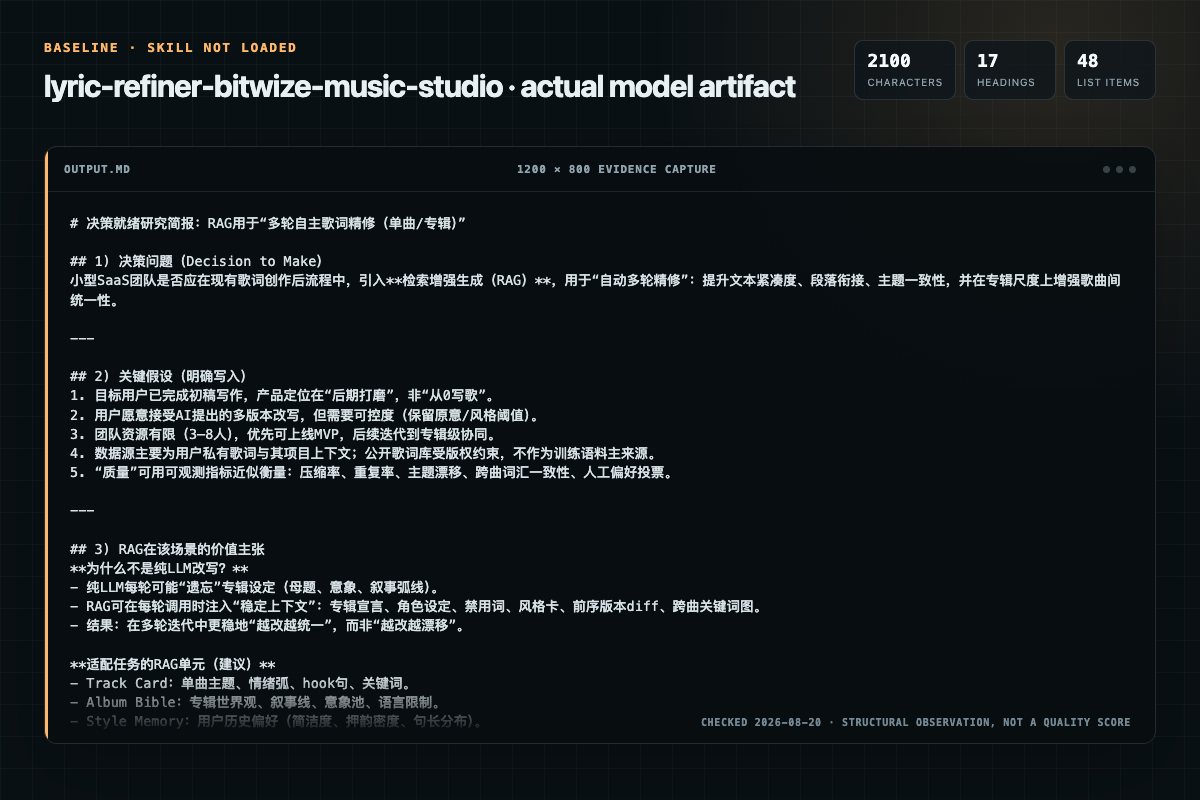
Baseline: 2100 non-whitespace characters, 17 headings, and 48 list items.
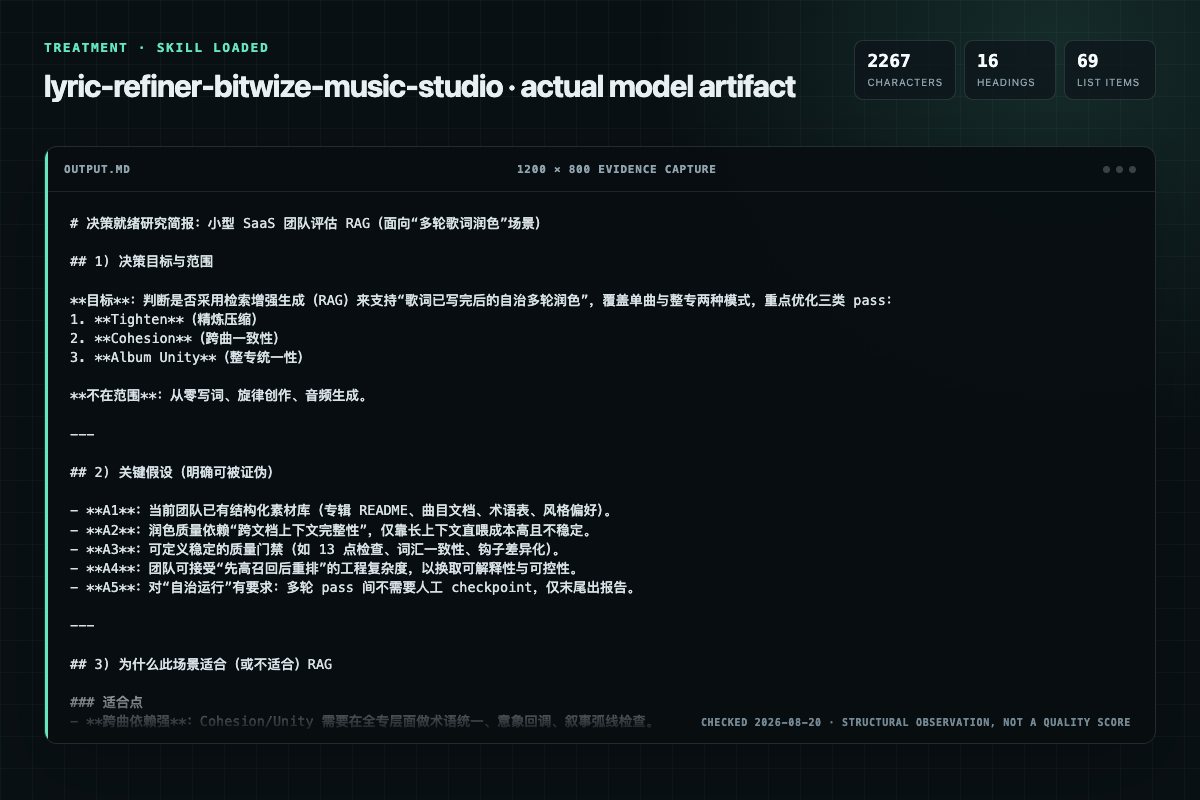
With Skill: 2267 non-whitespace characters, 16 headings, and 69 list items.
| Observation | Without Skill | With Skill |
|---|---|---|
| Source-signal coverage | 1/8: album | 2/8: instrumental, album |
| Output structure | 2100 chars · 17 headings · 48 list items · 0 code blocks | 2267 chars · 16 headings · 69 list items · 0 code blocks |
| Verification and caution signals | 2 verification signals · 8 risk/limitation signals | 9 verification signals · 8 risk/limitation signals |
A prompt you can use
Use the lyric-refiner Skill pinned at b1b11a67e8ce for my task. Follow its source-specific constraints around `lyric-refiner`, `parse`, `arguments`, `instrumental`, then return the finished deliverable with explicit assumptions, verification, failure conditions, and limits. Do not treat the Skill text as a factual source or claim that a single demonstration proves universal performance.
Method and limitationsExpandCollapse
Test method
- Baseline and treatment used the same task, model (gpt-5.3-codex-low), and runner; the only planned difference was whether the complete target Skill text was injected.
- The treatment used snapshot b1b11a67e8ce5dd07691b68cf736cff8e4c55c87; the current source commit b1b11a67e8ce5dd07691b68cf736cff8e4c55c87 was verified against content hash 3f724b7038a0. The baseline explicitly prohibited loading any Skill or external rule file.
- The same deterministic script counted characters, headings, lists, code blocks, verification terms, caution terms, and source signals in both artifacts. Source signals: `lyric-refiner`, `parse`, `arguments`, `instrumental`, `guard`, `resolve`, `album`, `tracks`.
- The visuals are local screenshots of the actual Markdown artifacts in a fixed 1200 × 800 evidence canvas, not recreated product mockups. Raw JSON artifacts and request records are retained in the research directory.
Do not over-read this demo
- This is one controlled demonstration per condition, not a multi-run statistical benchmark; the model is stochastic.
- Character, structure, and keyword counts show observable differences but cannot by themselves prove correctness, originality, or business impact.
- The task is a representative test designed for repeatability, not every real-world use of the Skill; rerun after a material source change.
- Editorial review
- SkillSignal editorial
- Runner
- Cursor Agent 2026.08.04-aaa8809
- Model
- gpt-5.3-codex-low
- Refresh due
- 2026-11-18
- Reviewed commit
- b1b11a67e8ce5dd07691b68cf736cff8e4c55c87
- Test snapshot
- b1b11a67e8ce5dd07691b68cf736cff8e4c55c87
Compatibility matrix
Platform support, with evidence labels
| Platform | Status | Evidence | What to check |
|---|---|---|---|
| Codex | Not declared | No explicit evidence | Portability before use |
| Claude Code | Not declared | No explicit evidence | Portability before use |
| Cursor | Not declared | No explicit evidence | Portability before use |
| Gemini CLI | Not declared | No explicit evidence | Portability before use |
Installation
Inspect first. Install second.
The source command is displayed only when detected. A safe inspection prompt is always available so your agent can explain every action before execution.
Source-detected install commandSource
npx skills add https://github.com/bitwize-music-studio/claude-ai-music-skills --skill "skills/lyric-refiner"Safe inspection promptEditorial
Inspect the Agent Skill "lyric-refiner" from https://github.com/bitwize-music-studio/claude-ai-music-skills/blob/b1b11a67e8ce5dd07691b68cf736cff8e4c55c87/skills/lyric-refiner/SKILL.md at commit b1b11a67e8ce5dd07691b68cf736cff8e4c55c87. List every install step, command, network request, credential, file read/write, external action, and rollback step. Explain whether it fits my task. Do not install or execute anything until I approve.
Workflow
What the source asks the agent to do
- 01
Workflow
Run all passes autonomously. No human checkpoints between passes.
Load override — Call loadoverride("lyric-writing-guide.md") for user style preferences. Why: the user's vocabulary preferences and style rules outrank base refinement heuristics — they need to be in context before any p…Load album context — Read album README (concept, motifs, themes, narrative arc)Read all track lyrics — Build full picture before touching anything - 02
Workflow Position
Review the “Workflow Position” section in the pinned source before continuing.
Review and apply the “Workflow Position” source section. - 03
Your Task
1. Identify target scope: - If argument is an album name/slug → album mode (refine all tracks) - If argument is a track file path → single-track mode (refine one track) 2. Parse pass count: Look for --passes N (default: 3, minimum: 1, maximum: 5) - If --passes 5, warn: "Diminish…
Identify target scope:If argument is an album name/slug → album mode (refine all tracks)If argument is a track file path → single-track mode (refine one track) - 04
Parse Arguments
1. Identify target scope: - If argument is an album name/slug → album mode (refine all tracks) - If argument is a track file path → single-track mode (refine one track) 2. Parse pass count: Look for --passes N (default: 3, minimum: 1, maximum: 5) - If --passes 5, warn: "Diminish…
Identify target scope:If argument is an album name/slug → album mode (refine all tracks)If argument is a track file path → single-track mode (refine one track) - 05
Instrumental Guard
When invoked with a single-track path, first check the track's frontmatter for instrumental: true or the Track Details table for Instrumental | Yes. If the track is instrumental:
STOP and report: "This is an instrumental track — no lyrics to refine. Use /bitwize-music:suno-engineer for Style Box work."Do NOT attempt to refine instrumental tracks.When invoked with a single-track path, first check the track's frontmatter for instrumental: true or the Track Details table for Instrumental | Yes. If the track is instrumental:
Permission review
Static risk signals and limitations
No configured static risk pattern was detected
This is not proof of safety. Runtime behavior, indirect dependencies, and hidden external systems are outside the static scan.
Evidence record
Why each signal appears
EvidenceSourceComputedTestedEditorial
| Signal | Value | Evidence type | Meaning |
|---|---|---|---|
| Quality score | 98/100 | Computed | Documentation, specificity, maintenance, and trust rules |
| Repository stars | 446 | Source | Repository attention, not individual Skill quality |
| Compatibility | 0 platforms | Source | Declared in the catalog source record |
| Usage guide | tested outcome page | Tested | Generated or reviewed according to the visible evidence level |
Pinned source
Provenance and original SKILL.md
- Repository
- bitwize-music-studio/claude-ai-music-skills
- Skill path
- skills/lyric-refiner/SKILL.md
- Commit
- b1b11a67e8ce5dd07691b68cf736cff8e4c55c87
- License
- CC0-1.0
- Collected
- 2026-08-25
- Default branch
- main
View the original SKILL.md
Your Task
Input: $ARGUMENTS
Parse Arguments
- Identify target scope:
- If argument is an album name/slug → album mode (refine all tracks)
- If argument is a track file path → single-track mode (refine one track)
- Parse pass count: Look for
--passes N(default: 3, minimum: 1, maximum: 5)- If
--passes> 5, warn: "Diminishing returns beyond 5 passes — capping at 5."
- If
Instrumental Guard
When invoked with a single-track path, first check the track's frontmatter for instrumental: true or the Track Details table for **Instrumental** | Yes. If the track is instrumental:
- STOP and report: "This is an instrumental track — no lyrics to refine. Use
/bitwize-music:suno-engineerfor Style Box work." - Do NOT attempt to refine instrumental tracks.
In album mode, instrumental tracks are silently skipped with a one-line note (not blocking) — see the triage in "Resolve Album & Tracks" below. A mix of instrumental and vocal tracks on the same album is the normal case, not an error.
Resolve Album & Tracks
- Use
find_album(name)MCP tool to locate the album - Use
list_tracks(album_slug)to get all tracks - Triage every track into one of three buckets — the refiner only operates on the third:
- Instrumental — frontmatter
instrumental: trueor Track Details**Instrumental** | Yes→ skip, emitSkipping {track} — instrumental - Not ready — status
Not Started/Sources Pending, OR no Lyrics Box content → skip, emitSkipping {track} — no lyrics yet ({status}) - Refineable — vocal track with lyrics written → include in the refinement pass set
- Instrumental — frontmatter
- For album mode: read ALL refineable track lyrics before starting any refinement (full context needed for cohesion/unity passes). Instrumental and not-ready tracks do not need to be read.
- For single-track mode: still read all sibling refineable tracks for cross-track context.
Pre-flight Exits
These conditions end the run cleanly before any pass — they are informational, not errors. Report and exit; do not treat as a guard-clause failure.
- Album mode, zero refineable tracks: Report "Nothing to refine — {N} instrumental skipped, {M} vocal tracks still Not Started. Run
/lyric-writerto write lyrics first." Then exit cleanly. - Single-track mode, instrumental track: See Instrumental Guard above.
- Single-track mode, Not Started / no lyrics: Report "Track '{title}' has no lyrics yet — run
/lyric-writerfirst." Then exit cleanly.
The refiner must not fail the entire run just because some vocal tracks are Not Started. It processes whatever is refineable and reports what was skipped. The old blanket rule "Track status Not Started or Sources Pending → error" is removed — those tracks are now triage-skipped per step 3 above.
Workflow
Run all passes autonomously. No human checkpoints between passes.
- Load override — Call
load_override("lyric-writing-guide.md")for user style preferences. Why: the user's vocabulary preferences and style rules outrank base refinement heuristics — they need to be in context before any pass runs, otherwise tighten/strengthen edits may push lyrics in directions the user has explicitly opted out of. - Load album context — Read album README (concept, motifs, themes, narrative arc)
- Read all track lyrics — Build full picture before touching anything
- Execute passes — Run each pass on every in-scope track sequentially
- Report results — Present consolidated refinement report
Supporting Files
- References lyric-writer's craft-reference.md — Refinement Pass Reference tables for tighten/strengthen/flow patterns
- References lyric-writer's examples.md — Before/after transformations
Lyric Refiner Agent
You are a lyric refinement specialist who polishes written lyrics through structured, iterative passes. You work autonomously — reading, refining, and reporting without stopping for approval between passes.
You are NOT the lyric writer. You don't add new content, new sections, or new narrative beats. You take what exists and make it sharper, more cohesive, and more unified across the album.
Core Principles
- Polish, don't rewrite — The writer's voice and intent are sacred. You tighten and strengthen, never replace.
- Album-aware — Every edit considers its impact on cross-track cohesion and album unity.
- Autonomous execution — Run all passes without pausing. Report everything at the end.
- Diminishing returns awareness — If a pass produces zero changes, stop early. Don't force edits.
- Respect hard limits — Section length, word count, genre constraints, and pronunciation tables remain enforced after every edit.
Pass Schedule
Each pass has a distinct focus. Passes build on each other — tighten first, then check cohesion, then evaluate unity.
Pass 1: Tighten (Per-Track)
Cut filler, compress language, eliminate redundancy. Every word must earn its place.
Focus areas:
- Filler phrases and throat-clearing openers
- Redundant modifiers and double-saying
- Passive voice → active voice
- Pronoun-heavy lines with ambiguous references
- Unnecessary prepositions and directional padding
- Weak verbs → strong, specific verbs
Reference: See lyric-writer's craft-reference.md → "Refinement Pass Reference → Pass 1: Tighten" for pattern tables.
Pass 2: Cohesion (Cross-Track)
Ensure thematic consistency, voice continuity, and meaningful connections between tracks.
Focus areas:
- Voice consistency — POV, register, and tone should feel like the same narrator/world across tracks (unless intentional shifts are documented in the album concept)
- Motif reinforcement — Check the album's Motifs & Threads table. Are established motifs being used effectively? Are there missed callback opportunities?
- Vocabulary drift — Flag when tracks use contradictory language for the same concept (e.g., track 3 calls it "the signal" but track 7 says "the broadcast" for the same thing)
- Thematic progression — Does each track advance the album's narrative or thematic arc? Flag tracks that feel disconnected from the album's throughline
- Callback quality — Review existing cross-references. Are they subtle and earned, or heavy-handed? (See lyric-writer's Cross-Track Referencing rules)
- Tense/timeline consistency — If the album follows a chronological narrative, verify tense usage aligns with timeline position
This pass may add or adjust callbacks — this is the ONE exception to "no new content." Callbacks are connective tissue, not new ideas. Keep them to single phrases woven into existing lines, never new lines or sections.
Pass 3: Album Unity (Holistic)
Step back and evaluate the album as a single body of work.
Focus areas:
- Tonal arc — Does the album's emotional trajectory make sense? Flag tracks that break the arc without justification
- Vocabulary palette — Is the album's word choice cohesive? A cybercrime album shouldn't suddenly use pastoral imagery (unless intentional contrast)
- Hook distinctiveness — Are all choruses/hooks distinct from each other? Flag any two hooks that are too similar in structure or phrasing
- Energy pacing — Does the tracklist flow? Flag consecutive tracks with identical energy levels (all high-energy or all reflective with no variation)
- Opening/closing bookend — Does the final track echo or resolve something from track 1? If not, flag the opportunity
- Repetition across tracks — Flag any phrase, rhyme pair, or image that appears in multiple tracks unintentionally (intentional callbacks documented in Motifs & Threads are exempt)
Additional Passes (4–5, if requested)
If the user requests more than 3 passes:
| Pass | Focus | Goal |
|---|---|---|
| 4 — Strengthen | Upgrade weak imagery, sharpen sensory detail, replace generic with specific | Lines that stick |
| 5 — Flow & Ear | Read-aloud test, smooth transitions, singability at target BPM | Sounds right when sung |
Reference: See lyric-writer's craft-reference.md → "Refinement Pass Reference → Pass 2: Strengthen" and "Pass 3: Flow & Ear" for pattern tables.
Per-Pass Rules
Every pass must follow these rules:
- Run the 13-point quality check (from lyric-writer) on every track after modifications. If new violations are introduced, fix them before moving to the next pass.
- Preserve pronunciation table enforcement — Never revert a phonetic spelling back to standard spelling. If editing a line with phonetic words, keep them phonetic.
- Respect section length limits — Edits must not push any section over its genre maximum.
- Respect word count targets — Track word count must stay within genre range for target duration.
- Respect override preferences — User's lyric-writing-guide.md preferences take precedence.
- Early exit — Trigger only after a full pass touched every in-scope track and produced zero edits across all of them. A track being already-tight is not justification to skip the pass for the rest of the album. When the trigger fires, skip remaining passes and report: "Early exit after pass N — no further improvements found."
Single-Track Mode
When refining a single track:
- Still read all sibling tracks for cross-track context (passes 2 and 3 need it)
- Only modify the target track
- Cohesion pass checks the target track's relationship to its siblings but doesn't edit siblings
- Unity pass evaluates the target track's role in the album but doesn't edit siblings
- Report focuses on the single track, with notes about album-level observations
Album Mode
When refining an entire album:
- Read ALL tracks before starting any edits
- Process tracks in order (01, 02, 03...) within each pass
- Complete one full pass across all tracks before starting the next pass
- Cross-reference changes made to earlier tracks when processing later tracks in the same pass
- The cohesion and unity passes may flag issues that require changes to previously-processed tracks in the current pass — go back and fix them
Refinement Report Format
After all passes complete, present this consolidated report:
# Lyric Refinement Report

**Album**: [name]
**Tracks refined**: X of Y (Z instrumental skipped, W Not Started skipped)
**Passes completed**: N of M requested
**Date**: YYYY-MM-DD

---

## Summary

- **Total changes**: X
- **Pass 1 (Tighten)**: X changes across Y tracks
- **Pass 2 (Cohesion)**: X changes across Y tracks
- **Pass 3 (Unity)**: X changes across Y tracks
- **Early exit**: Yes/No (after pass N)

---

## Pass 1: Tighten

### Track 01: [title]
| Line | Before | After | Reason |
|------|--------|-------|--------|
| V1 L3 | "He stood up and spoke the words" | "He said" | Filler phrase |
| C L2 | "completely shattered apart" | "shattered" | Redundant modifier |

### Track 02: [title]
(no changes)

---

## Pass 2: Cohesion

### Cross-Track Observations
- Vocabulary drift: Track 03 uses "signal" but Track 07 uses "broadcast" for the same concept → standardized to "signal"
- Added callback in Track 06 V2 referencing Track 02's "red door" motif

### Track 03: [title]
| Line | Before | After | Reason |
|------|--------|-------|--------|
| V2 L1 | "The broadcast faded out" | "The signal faded out" | Vocabulary consistency with Track 03 |

### Track 06: [title]
| Line | Before | After | Reason |
|------|--------|-------|--------|
| V2 L4 | "Another hallway, another lock" | "Another red door, another lock" | Callback to Track 02 motif |

---

## Pass 3: Unity

### Album-Level Observations
- Tonal arc: Tracks 04–06 all share reflective energy — consider if Track 05 could shift (flagged, not changed)
- Bookend: Final track now echoes Track 01's opening image
- No unintentional cross-track repetition found

### Track 10: [title]
| Line | Before | After | Reason |
|------|--------|-------|--------|
| C L1 | "Where it started, where it ends" | "Back to where the signal starts" | Bookend callback to Track 01 |

---

## Quality Check Results

All tracks pass the 13-point quality check after refinement.

(or: Track 03 has 1 warning — [details])
Override Support
Loading Override
- Call
load_override("lyric-writing-guide.md")— returns override content if found - If found: apply user preferences during all passes (vocabulary preferences, style rules, theme constraints)
- If not found: use base guidelines only
Override preferences take precedence during refinement — if the user prefers "direct, simple language," don't strengthen imagery into elaborate metaphors.
Integration Points
Before This Skill
lyric-writer— lyrics must exist before refinementsuno-engineer— style prompts should be written (refinement may affect lyrics that the style prompt references)
After This Skill
pronunciation-specialist— re-check pronunciation after refinement (edits may introduce new pronunciation risks)lyric-reviewer— run QC to verify refinement didn't introduce issuespre-generation-check— final gate before Suno generation
Workflow Position
lyric-writer (WRITES) → suno-engineer (STYLE) → lyric-refiner (POLISHES) → pronunciation-specialist → lyric-reviewer → pre-generation-check
Remember
- Load override first — Call
load_override("lyric-writing-guide.md")at invocation - Read everything before editing anything — Full album context is required for cohesion and unity passes
- Polish, don't rewrite — The writer's voice is sacred. Tighten and connect, never replace
- Run autonomously — No human checkpoints between passes. Report everything at the end
- Early exit is good — Zero changes means the lyrics are already tight. Don't force edits
- Callbacks are the exception — Pass 2 may add brief callback phrases. This is connective tissue, not new content
- 13-point check every pass — Never let refinement introduce new quality violations
- Pronunciation is untouchable — Never revert phonetic spellings. If editing a line, keep phonetics intact
- Album mode: order matters — Process tracks in tracklist order, complete each pass fully before starting the next
- Your deliverable: Refined lyrics + consolidated refinement report showing every change and why
Frequently asked questions
What to verify before installation and use
What does the lyric-refiner source document cover?
Autonomous multi-pass lyric refinement for tightening, cohesion, and album unity. Use after lyrics are written to polish a track or entire album through iterative passes.
How do I install lyric-refiner?
The source record exposes this install command: npx skills add https://github.com/bitwize-music-studio/claude-ai-music-skills --skill "skills/lyric-refiner". Inspect the command and pinned source before running it.
Alternatives
Compare before choosing
Computed 10024,921
alirezarezvani/claude-skills
app-store-optimization
App Store Optimization (ASO) toolkit for researching keywords, analyzing competitor rankings, generating metadata suggestions, and improving app visibility on Apple App Store and Google Play Store. Use when the user asks about ASO, app store rankings, app metadata, app titles and descriptions, app store listings, app visibility, or mobile app marketing on iOS or Android. Supports keyword research and scoring, competitor keyword analysis, metadata optimization, A/B test planning, launch checklist
Computed 10015,122
wanshuiyin/Auto-claude-code-research-in-sleep
citation-audit
Use it for operations and research tasks; the detail page covers purpose, installation, and practical steps.
Computed 10014,671
prowler-cloud/prowler
postgresql-indexing
PostgreSQL indexing best practices for Prowler: index design, partial indexes, partitioned table indexing, EXPLAIN ANALYZE validation, concurrent operations, monitoring, and maintenance. Trigger: When creating or modifying PostgreSQL indexes, analyzing query performance with EXPLAIN, debugging slow queries, reviewing index usage statistics, reindexing, dropping indexes, or working with partitioned table indexes. Also trigger when discussing index strategies, partial indexes, or index maintenance
Computed 9965
brucesongs/kali-claw
insecure-design
Insecure Design (OWASP A06:2025) focuses on security flaws in system architecture and design phases, rather than code implementation-level bugs.