
Best for
- Prove a fresh uninstall/install/launch loop for a native Android app
- Diagnose stale installs or stale screenshots in emulator-driven workflows
- Inspect built APK/AAB contents when installation or launch fails
vasilyu1983/AI-Agents-public/frameworks/shared-skills/skills/software-android-runtime-debugging/SKILL.md
Build/install/launch proof, ANR/jank/memory triage, and stale-build debugging for native Android apps. Use when runtime truth, performance, or crash root cause is in doubt.
Decision brief
Use this skill when the core problem is not app architecture or visual design, but runtime truth: did the current APK/AAB build, install, launch, and render on the intended emulator or device — and, once that's proven, why is it slow, freezing, or leaking memory?
In this controlled same-task single run, enabling software-android-runtime-debugging changed the output from 3836 non-whitespace characters and 9 headings to 3744 characters and 9 headings. Matches among 8 signals extracted from the pinned source changed from 3 to 2. Both actual outputs are shown; this is a structural observation, not a quality score or a universal performance claim.
Design and implement a representative production change for a TypeScript webhook retry service. Include the key code or pseudocode, tradeoffs, and verification steps. The deliverable must specifically reflect this user intent: Build/install/launch proof, ANR/jank/memory triage, and stale-build debugging for native Android apps. Use when runtime truth, performance, or crash root cause is in doubt.
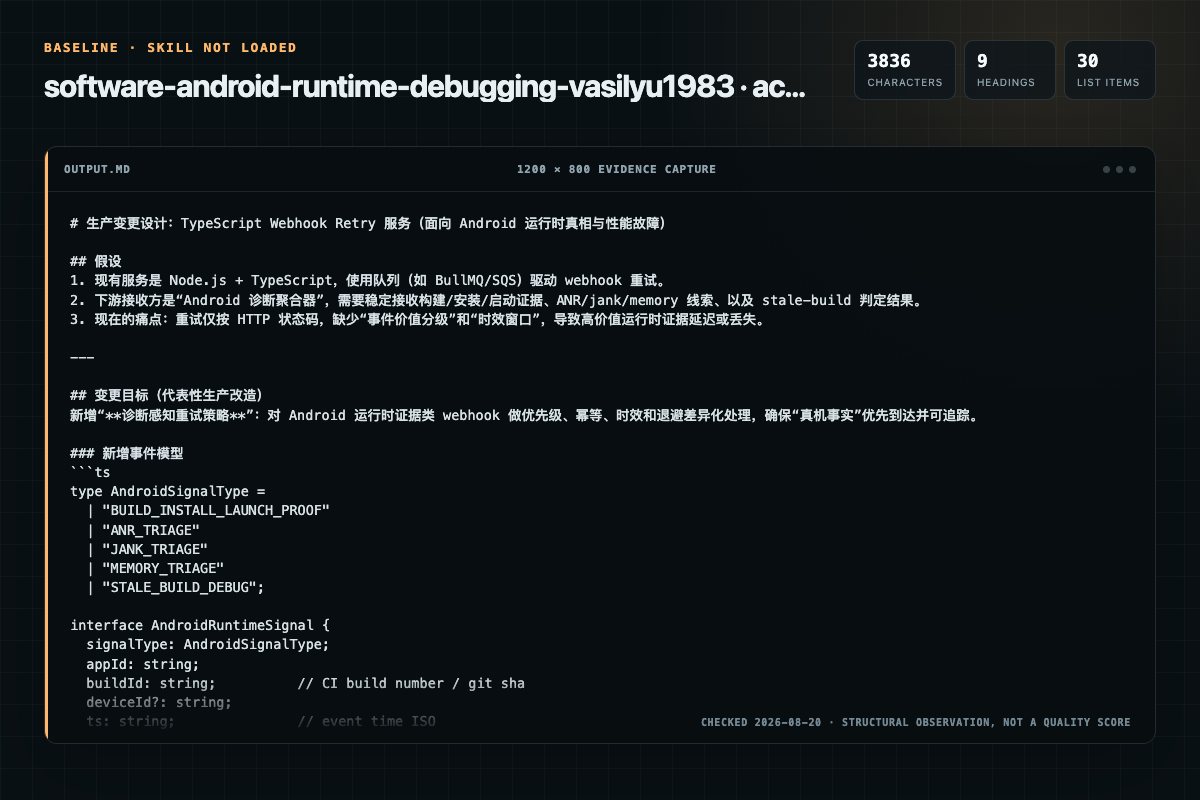
Baseline: 3836 non-whitespace characters, 9 headings, and 30 list items.
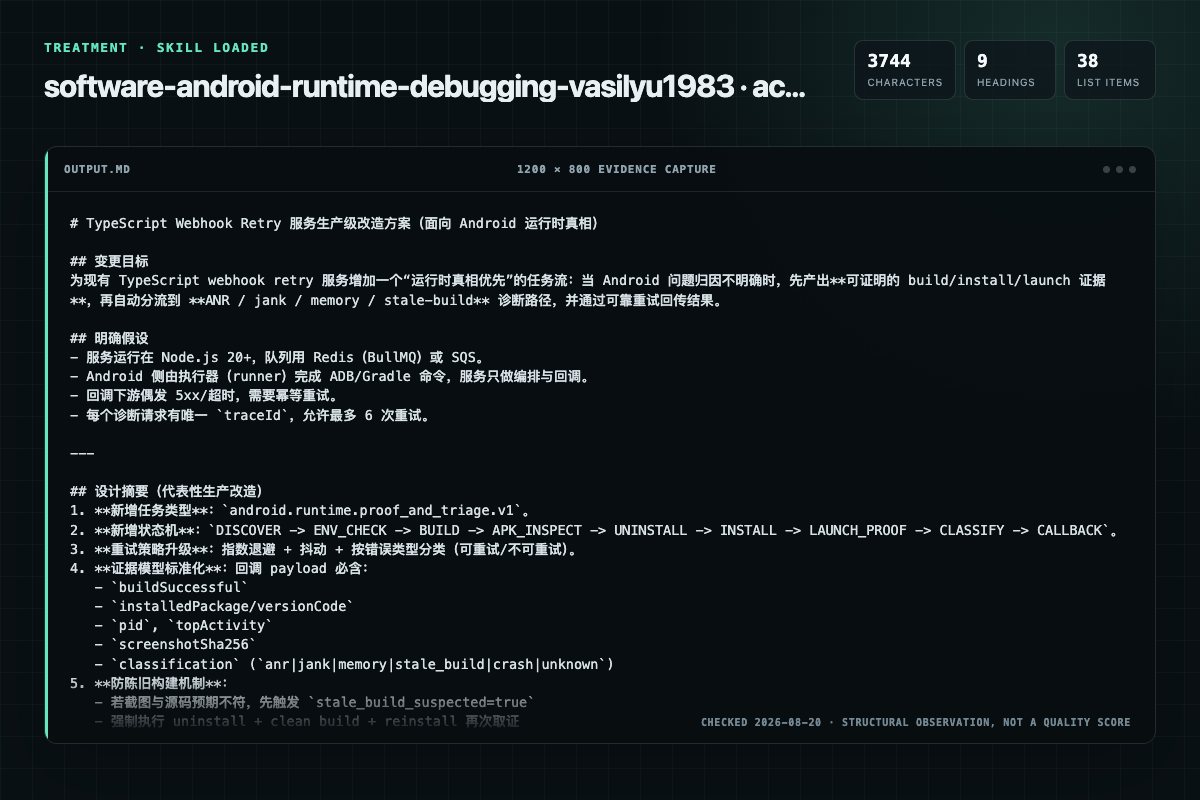
With Skill: 3744 non-whitespace characters, 9 headings, and 38 list items.
| Observation | Without Skill | With Skill |
|---|---|---|
| Source-signal coverage | 3/8: android, runtime, debugging | 2/8: android, runtime |
| Output structure | 3836 chars · 9 headings · 30 list items · 2 code blocks | 3744 chars · 9 headings · 38 list items · 2 code blocks |
| Verification and caution signals | 8 verification signals · 5 risk/limitation signals | 8 verification signals · 2 risk/limitation signals |
Use the software-android-runtime-debugging Skill pinned at c95ab14ef8cf for my task. Follow its source-specific constraints around `software-android-runtime-debugging`, `native`, `android`, `runtime`, then return the finished deliverable with explicit assumptions, verification, failure conditions, and limits. Do not treat the Skill text as a factual source or claim that a single demonstration proves universal performance.
Compatibility matrix
| Platform | Status | Evidence | What to check |
|---|---|---|---|
| Codex | Declared | Source record | Install path and trigger |
| Claude Code | Declared | Source record | Install path and trigger |
| Cursor | Not declared | No explicit evidence | Portability before use |
| Gemini CLI | Not declared | No explicit evidence | Portability before use |
Installation
The source command is displayed only when detected. A safe inspection prompt is always available so your agent can explain every action before execution.
npx skills add https://github.com/vasilyu1983/AI-Agents-public --skill "frameworks/shared-skills/skills/software-android-runtime-debugging"Inspect the Agent Skill "software-android-runtime-debugging" from https://github.com/vasilyu1983/AI-Agents-public/blob/53f6cb73ea53a2646e3e7d4665062ad66f3683ac/frameworks/shared-skills/skills/software-android-runtime-debugging/SKILL.md at commit 53f6cb73ea53a2646e3e7d4665062ad66f3683ac. List every install step, command, network request, credential, file read/write, external action, and rollback step. Explain whether it fits my task. Do not install or execute anything until I approve.
Workflow
1. Discover the project entrypoint: build.gradle.kts (root and app module), applicationId, build variant (debug/release), target device or emulator. 2. Check environment: ANDROIDHOME set, JDK version matches AGP requirement, Gradle wrapper present, adb devices shows the target,…
Android 17 (API 37) shipped 2026-06-16; Android 16 (API 36) is the prior release. Verify at developer.android.com/about/versions before citing a specific version as latest — this changes roughly annually.
Review the “Quick Reference” section in the pinned source before continuing.
Prove a fresh uninstall/install/launch loop for a native Android app
Review the “ASCII Flow” section in the pinned source before continuing.
Permission review
No configured static risk pattern was detected
This is not proof of safety. Runtime behavior, indirect dependencies, and hidden external systems are outside the static scan.
Evidence record
| Signal | Value | Evidence type | Meaning |
|---|---|---|---|
| Quality score | 98/100 | Computed | Documentation, specificity, maintenance, and trust rules |
| Repository stars | 80 | Source | Repository attention, not individual Skill quality |
| Compatibility | 2 platforms | Source | Declared in the catalog source record |
| Usage guide | tested outcome page | Tested | Generated or reviewed according to the visible evidence level |
Pinned source
Use this skill when the core problem is not app architecture or visual design, but runtime truth: did the current APK/AAB build, install, launch, and render on the intended emulator or device — and, once that's proven, why is it slow, freezing, or leaking memory?
This skill owns stale-build suspicion, emulator drift, malformed APKs, ADB failures, Gradle cache corruption, ProGuard/R8 stripping, Compose recomposition issues, ANR/jank/memory/startup performance triage, and the proof loop required before trusting screenshots, UI behavior, or downstream API/auth debugging.
.so) libraries as of 2026-05-01. An app whose ELF LOAD segments are still 4KB-aligned runs in a 16KB backcompat mode; test on a 16KB-page-size emulator image, not just the default. Verify current enforcement at developer.android.com/guide/practices/page-sizes.| Symptom | First Move | Notes |
|---|---|---|
| Screenshot does not match source | Uninstall + clean build + install + launch | Assume stale APK first |
INSTALL_FAILED_UPDATE_INCOMPATIBLE | adb uninstall <pkg> then reinstall | Signing key mismatch between builds |
| App crashes immediately on launch | Check logcat for first FATAL EXCEPTION | Missing Activity in manifest or ProGuard stripping |
ClassNotFoundException / NoSuchMethodError at runtime | Check ProGuard/R8 keep rules | Minification removed referenced class or method |
| Emulator stuck on boot animation | Cold boot AVD or wipe data | Snapshot corruption is common after SDK updates |
BUILD FAILED with dependency resolution | Check libs.versions.toml and repositories block | Version catalog mismatch or missing repo |
| Gradle sync fails in Android Studio | ./gradlew --stop && ./gradlew --refresh-dependencies | Daemon or cache corruption |
adb: device not found | adb kill-server && adb start-server && adb devices | USB debugging off or emulator not connected |
| App shows old layout after Compose changes | Clean build; check recomposition stability | Incremental build may not invalidate Compose output |
| Resources not found at runtime | Inspect APK with aapt2 dump resources | Missing from merged manifest or wrong resource qualifier |
minSdk version error on install | Check device API level vs minSdk in build.gradle.kts | APK requires higher API than device provides |
| KSP/KAPT annotation processing errors | Check processor version matches Kotlin version | KSP is tightly coupled to the Kotlin compiler version |
| Logcat shows nothing from the app | Filter by PID: adb logcat --pid=$(adb shell pidof <pkg>) | Default logcat is too noisy to be useful |
| App works on emulator but crashes on device | Check for x86-only native libs (.so) | Emulator runs x86; most devices run ARM |
| Compose UI renders but interactions do nothing | Check clickable modifier order and state hoisting | Modifier order determines hit-testing; state must be hoisted |
CalledFromWrongThreadException after StateFlow update | Move _uiState.value = ... back onto the main dispatcher | Keep withContext(Dispatchers.IO) { ... } pure: return a value, mutate state outside the block |
ConcurrentModificationException inside SnapshotStateObserver | Upgrade to Compose UI 1.10.1+ OR eliminate off-main state mutation | Compose 1.10.0-rc01 fixed a reentrant-modification race; 1.10.1 fixed pausable composition + LookaheadScope |
Nested Popup pinned to screen top instead of anchor | Upgrade to Compose UI 1.10.1+ | PopupPositionProvider absolute-coordinate bug, fixed in 1.10.0 / 1.10.1 |
Argument type mismatch: Function0<Unit> vs @Composable ComposableFunction0<Unit> | Verify kotlin("plugin.compose") is applied and version-locked to the Kotlin compiler | Kotlin 2.x ships the Compose compiler bundled; missing/stale plugin declaration skips the composable transform |
Release crash SerializationException: Serializer for class 'X' is not found or ExceptionInInitializerError | Add explicit keep rules for @Serializable classes; run a release-variant smoke test | kotlinx-serialization 1.9.0+ + R8 full mode strips reflectively-referenced serializers |
LazyColumn recomposes whole list on every unrelated update | Hoist derived lists to ViewModel; remember(id) { } around item callbacks | Strong Skipping Mode (Kotlin 2.x) compares unstable params by reference, not structural equality |
| System shows "App isn't responding" or Play Console reports an ANR cluster | Read the ANR trace first, do not open a profiler yet | Blocked-thread stack is already in the trace; classify by which watchdog fired (input/broadcast/service) |
| Scrolling stutters or animation skips frames, app otherwise responsive | adb shell dumpsys gfxinfo <pkg> framestats, then Perfetto if the cause isn't obvious | This is jank, not an ANR — different tool, different budget math (16.67ms @60Hz, 8.33ms @120Hz) |
| App feels slower over a session or gets OOM-killed | adb shell dumpsys meminfo <pkg> trend, then LeakCanary (debug) or a heap dump (release) | Confirm monotonic growth before assuming a leak; one-time cache warm-up is not a leak |
| Cold start feels slow but no measurement exists yet | Macrobenchmark StartupTimingMetric with explicit StartupMode.COLD | Do not guess a fix before there's a baseline number; warm/hot starts have different budgets than cold |
| Dropped frame blamed on "GC" without checking the trace | Open the Perfetto thread-state track for that frame | Binder/IPC contention produces the same visible symptom as a GC pause and is commonly misdiagnosed as GC |
Use this skill to:
build.gradle.kts (root and app module), applicationId, build variant (debug/release), target device or emulator.ANDROID_HOME set, JDK version matches AGP requirement, Gradle wrapper present, adb devices shows the target, emulator booted or device connected../gradlew assembleDebug.
Confirm output ends with BUILD SUCCESSFUL.aapt2 dump badging app/build/outputs/apk/debug/app-debug.apk.
Verify applicationId, versionCode, minSdk, declared activities, and expected resources.adb uninstall <applicationId>.adb install -r app/build/outputs/apk/debug/app-debug.apk.adb shell am start -n <applicationId>/<fully.qualified.Activity>, then capture logcat output and a screenshot (adb exec-out screencap -p > proof.png).Android runtime failure
-> Capture exact device, API, build, repro, and logcat window
-> Prove fresh install and launch state
-> Classify: crash, ANR, lifecycle, Compose, network, storage, or release
-> Inspect stack, logs, profiler, and UI hierarchy evidence
-> Patch the smallest failing path
-> Rerun same repro and keep before/after proof
adb shell pidof <pkg>), the correct Activity is in the foreground (adb shell dumpsys activity top), and the expected content rendered (screenshot or UI automator dump).versionCode against the build output before trusting the capture.See references/runtime-proof-loop.md.
jvmargs or plugin versions, stop it with ./gradlew --stop and rebuild.See references/stale-build-triage.md.
When installation or launch fails, inspect the built artifact directly:
aapt2 dump badging <apk> — verify applicationId, versionCode, minSdk, targetSdk, declared activities and permissionsapp/build/intermediates/merged_manifests/)aapt2 dump resources <apk>.so files present for correct ABIs (lib/arm64-v8a/, lib/armeabi-v7a/, lib/x86_64/)mapping.txt exists alongside the APK for crash symbolicationGradle is the most common source of build failures. Common patterns: dependency resolution, version catalog drift, KSP/KAPT version mismatches, AGP compatibility, and configuration cache invalidation.
See references/gradle-build-troubleshooting.md.
Jetpack Compose introduces recomposition, stability, and compiler-level concerns that do not exist in View-based UI. When Compose UI behaves unexpectedly — interactions silently fail, UI does not update, or performance is poor — use Compose-specific debugging before blaming app logic.
See references/compose-debugging.md.
Once build/install/launch is proven, "the app is slow" or "the app freezes" is not one problem — it is an ANR, jank, a memory leak, or a slow start, and each has a different first move. Classify before reaching for a profiler:
framestats, escalate to Perfetto.dumpsys meminfo before assuming a leak.When not to microbenchmark: a microbenchmark measures one function's CPU cost in isolation. It cannot see cold-start AOT/JIT/class-loading cost (use Macrobenchmark instead), cannot see multi-frame jank pipeline stages (use Perfetto/framestats first), and should never run before a trace has confirmed the function is actually on the critical path.
Common misdiagnosis to catch: a dropped frame during an IPC-heavy screen looks identical to a GC pause from the outside. Check the Perfetto thread-state track — GC pauses show explicit GC markers; binder contention shows the calling thread blocked on a transaction to another process. Do not write "it's GC" into a report without checking the trace.
See references/performance-triage.md for the full decision tree, ANR thresholds, frame budget math, Perfetto/Macrobenchmark/StrictMode/LeakCanary usage, ART GC behavior, current Play Console vitals thresholds, and more misdiagnosis patterns.
R8 (the default code shrinker) can remove classes, methods, and fields that are referenced only via reflection, serialization, or framework conventions. When release builds crash with ClassNotFoundException, NoSuchMethodError, or silent data corruption, suspect R8 stripping before app logic.
See references/proguard-r8-triage.md.
| Resource | Purpose |
|---|---|
| references/runtime-proof-loop.md | Canonical build/install/launch verification loop |
| references/stale-build-triage.md | Heuristics for stale APKs, Gradle cache, and emulator drift |
| references/gradle-build-troubleshooting.md | Dependency resolution, version catalogs, AGP, and daemon issues |
| references/compose-debugging.md | Recomposition tracking, stability, compiler reports, and common pitfalls |
| references/proguard-r8-triage.md | R8 stripping, keep rules, mapping files, and library-specific rules |
| references/performance-triage.md | ANR/jank/memory/startup decision tree, Perfetto, Macrobenchmark, StrictMode, LeakCanary, ART GC, Play Console vitals, misdiagnoses |
| data/sources.json | Primary Android platform and tooling sources |
| Template | Purpose |
|---|---|
| assets/template-android-runtime-debug-request.md | Short request format for proof-first runtime debugging |
| Skill | Purpose |
|---|---|
| software-android-native | Native Android implementation and architecture after runtime truth exists |
| qa-testing-android | Espresso, UI Automator, Compose testing, and device matrix after installability is proven |
| qa-debugging | General debugging methodology not specific to Android runtime |
| software-mobile | Mobile platform choice and cross-platform tradeoffs |
Before applying this skill on a non-trivial task, read learnings.consolidated.md in this directory (and learnings.md if present).
After applying it, if you encountered a pattern worth remembering, a mistake worth preventing, or a domain fact that surprised you, append one dated bullet to learnings.md via agents-skills-feedback-loop/scripts/append_learning.py. Do not modify SKILL.md itself.
Frequently asked questions
Use this skill when the core problem is not app architecture or visual design, but runtime truth: did the current APK/AAB build, install, launch, and render on the intended emulator or device — and, once that's proven, why is it slow, freezing, or leaking memory?
The source record exposes this install command: npx skills add https://github.com/vasilyu1983/AI-Agents-public --skill "frameworks/shared-skills/skills/software-android-runtime-debugging". Inspect the command and pinned source before running it.
The pinned source record declares support for: codex, claude code.
Alternatives
vasilyu1983/AI-Agents-public
Configures Claude Code hooks and Codex hooks.json/notify callbacks. Use when adding guardrails, preflight, audit trails, worktree automation, or budget enforcement.
vasilyu1983/AI-Agents-public
Guides iOS testing with XCTest, XCUITest, Swift Testing, simctl, and xcresult. Use when choosing destinations, controlling flakes, or parsing test artifacts for native apps.
samber/cc-skills-golang
Monadic types for Golang using samber/mo — Option, Result, Either, Future, IO, Task, and State types for type-safe nullable values, error handling, and functional composition with pipeline sub-packages. Apply when using or adopting samber/mo, when the codebase imports `github.com/samber/mo`, or when considering functional programming patterns as a safety design for Golang.
vasilyu1983/AI-Agents-public
Guides multi-GPU pre-training: DDP, FSDP2, ZeRO, tensor/pipeline/expert parallelism, fp8/Muon. Use when scaling a run, training MoE, or reproducing GPT-2 on rented GPUs.