
Tested demoQuality 96/100
davepoon/buildwithclaude/plugins/all-skills/skills/wrike-automation/SKILL.md
wrike-automation
Automate Wrike project management via Rube MCP (Composio): create tasks/folders, manage projects, assign work, and track progress. Always search tools first for current schemas.
- Source repository stars
- 3,343
- Declared platforms
- 0
- Static risk flags
- 1
- Last source update
- 2026-08-24
- Source checked
- 2026-08-25
Decision brief
What it does: where it fits
Automate Wrike project management operations through Composio's Wrike toolkit via Rube MCP.
Not for
- Tasks that require unconfirmed production actions or broad system permissions.
- Environments where the pinned source and install steps cannot be inspected.
Controlled single-run demoChecked 2026-08-20
What changed when the Skill was used
In this controlled same-task single run, enabling wrike-automation changed the output from 2207 non-whitespace characters and 16 headings to 2808 characters and 19 headings. Matches among 8 signals extracted from the pinned source changed from 1 to 1. Both actual outputs are shown; this is a structural observation, not a quality score or a universal performance claim.
Same test task
Create an operational runbook for repeated webhook delivery failures. Include triage, safe actions, escalation, recovery, and verification. The deliverable must specifically reflect this user intent: Automate Wrike project management via Rube MCP (Composio): create tasks/folders, manage projects, assign work, and track progress. Always search tools first for current schemas.
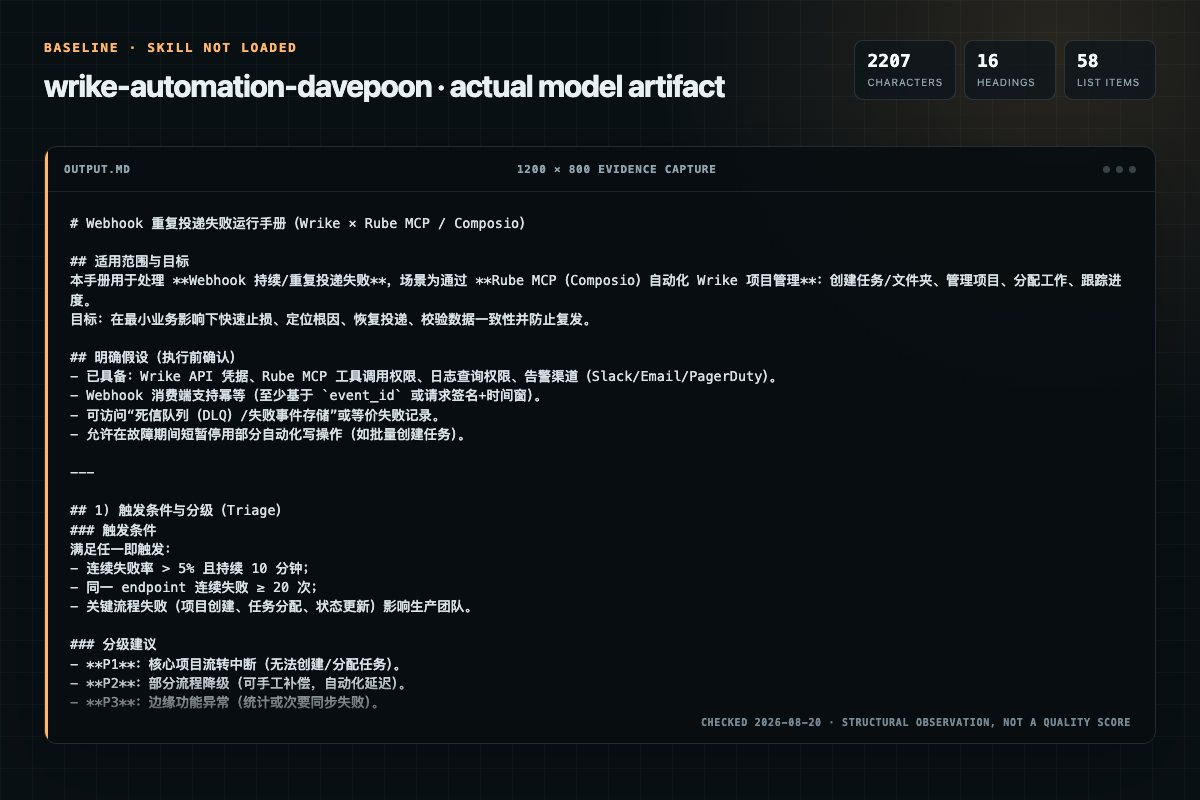
Baseline: 2207 non-whitespace characters, 16 headings, and 58 list items.
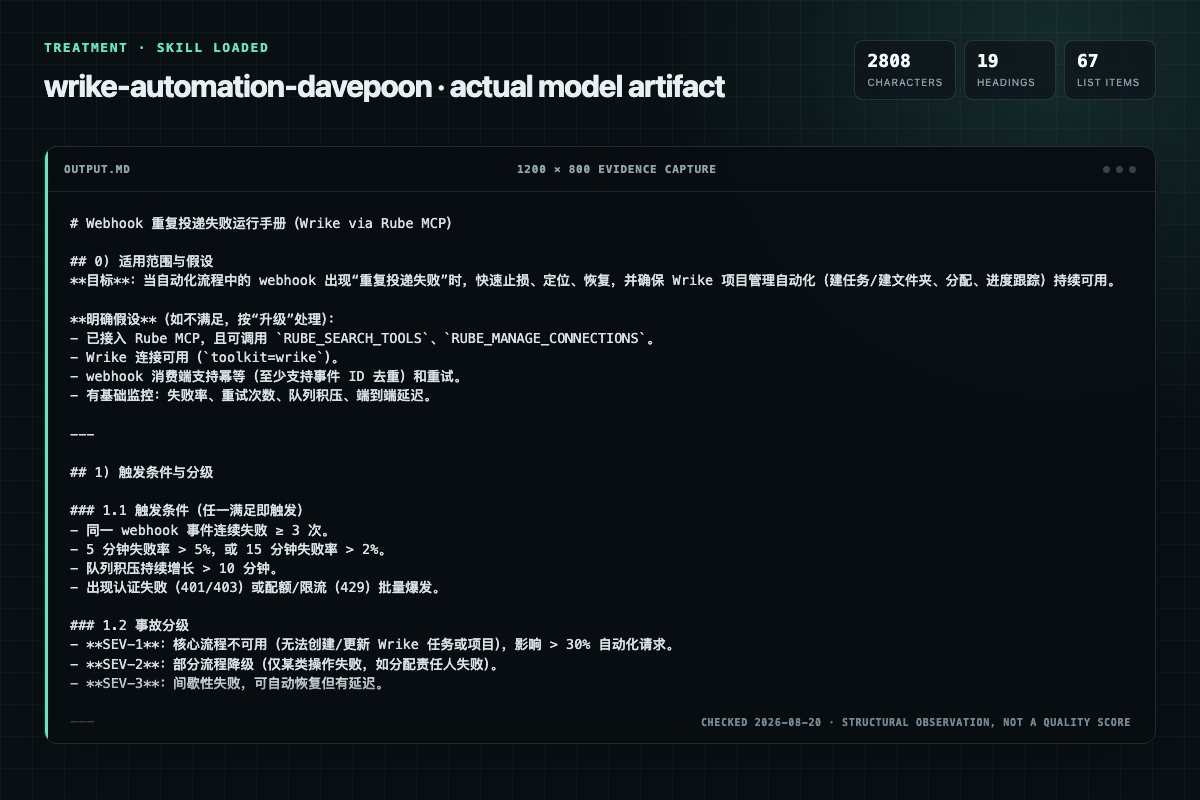
With Skill: 2808 non-whitespace characters, 19 headings, and 67 list items.
| Observation | Without Skill | With Skill |
|---|---|---|
| Source-signal coverage | 1/8: wrike | 1/8: wrike |
| Output structure | 2207 chars · 16 headings · 58 list items · 0 code blocks | 2808 chars · 19 headings · 67 list items · 0 code blocks |
| Verification and caution signals | 23 verification signals · 5 risk/limitation signals | 26 verification signals · 7 risk/limitation signals |
A prompt you can use
Use the wrike-automation Skill pinned at e8b2fa011fa3 for my task. Follow its source-specific constraints around `wrike-automation`, `wrike`, `automation`, `prerequisites`, then return the finished deliverable with explicit assumptions, verification, failure conditions, and limits. Do not treat the Skill text as a factual source or claim that a single demonstration proves universal performance.
Method and limitationsExpandCollapse
Test method
- Baseline and treatment used the same task, model (gpt-5.3-codex-low), and runner; the only planned difference was whether the complete target Skill text was injected.
- The treatment used snapshot 124dfadb0b164ea1cbd61b7a2a8d602b772dae77; the current source commit e8b2fa011fa33f9530caa70a73e4f4c74fef7834 was verified against content hash 510e6c76b3ba. The baseline explicitly prohibited loading any Skill or external rule file.
- The same deterministic script counted characters, headings, lists, code blocks, verification terms, caution terms, and source signals in both artifacts. Source signals: `wrike-automation`, `wrike`, `automation`, `prerequisites`, `setup`, `workflows`, `create`, `manage`.
- The visuals are local screenshots of the actual Markdown artifacts in a fixed 1200 × 800 evidence canvas, not recreated product mockups. Raw JSON artifacts and request records are retained in the research directory.
Do not over-read this demo
- This is one controlled demonstration per condition, not a multi-run statistical benchmark; the model is stochastic.
- Character, structure, and keyword counts show observable differences but cannot by themselves prove correctness, originality, or business impact.
- The task is a representative test designed for repeatability, not every real-world use of the Skill; rerun after a material source change.
- Editorial review
- SkillSignal editorial
- Runner
- Cursor Agent 2026.08.04-aaa8809
- Model
- gpt-5.3-codex-low
- Refresh due
- 2026-11-18
- Reviewed commit
- e8b2fa011fa33f9530caa70a73e4f4c74fef7834
- Test snapshot
- 124dfadb0b164ea1cbd61b7a2a8d602b772dae77
Compatibility matrix
Platform support, with evidence labels
| Platform | Status | Evidence | What to check |
|---|---|---|---|
| Codex | Not declared | No explicit evidence | Portability before use |
| Claude Code | Not declared | No explicit evidence | Portability before use |
| Cursor | Not declared | No explicit evidence | Portability before use |
| Gemini CLI | Not declared | No explicit evidence | Portability before use |
Installation
Inspect first. Install second.
The source command is displayed only when detected. A safe inspection prompt is always available so your agent can explain every action before execution.
Source-detected install commandSource
npx skills add https://github.com/davepoon/buildwithclaude --skill "plugins/all-skills/skills/wrike-automation"Safe inspection promptEditorial
Inspect the Agent Skill "wrike-automation" from https://github.com/davepoon/buildwithclaude/blob/ebd20fe1d82fa74e9a2f94abfeff88090f6c758c/plugins/all-skills/skills/wrike-automation/SKILL.md at commit ebd20fe1d82fa74e9a2f94abfeff88090f6c758c. List every install step, command, network request, credential, file read/write, external action, and rollback step. Explain whether it fits my task. Do not install or execute anything until I approve.
Workflow
What the source asks the agent to do
- 01
Setup
Get Rube MCP: Add https://rube.app/mcp as an MCP server in your client configuration. No API keys needed — just add the endpoint and it works.
Verify Rube MCP is available by confirming RUBESEARCHTOOLS respondsCall RUBEMANAGECONNECTIONS with toolkit wrikeIf connection is not ACTIVE, follow the returned auth link to complete Wrike OAuth - 02
Custom Field Setup
Review the “Custom Field Setup” section in the pinned source before continuing.
Review and apply the “Custom Field Setup” source section. - 03
Prerequisites
Rube MCP must be connected (RUBESEARCHTOOLS available)
Rube MCP must be connected (RUBESEARCHTOOLS available)Active Wrike connection via RUBEMANAGECONNECTIONS with toolkit wrikeAlways call RUBESEARCHTOOLS first to get current tool schemas - 04
Core Workflows
When to use: User wants to create, assign, or update tasks in Wrike
WRIKEGETFOLDERS - Find the target folder/project [Prerequisite]WRIKEGETALLCUSTOMFIELDS - Get custom field IDs if needed [Optional]WRIKECREATETASK - Create a new task [Required] - 05
1. Create and Manage Tasks
When to use: User wants to create, assign, or update tasks in Wrike
WRIKEGETFOLDERS - Find the target folder/project [Prerequisite]WRIKEGETALLCUSTOMFIELDS - Get custom field IDs if needed [Optional]WRIKECREATETASK - Create a new task [Required]
Permission review
Static risk signals and limitations
Writes files
The documentation asks the agent to create, modify, or delete local files.
`WRIKE_CREATE_FOLDER` - Create a new folder/project [Optional]Writes files
The documentation asks the agent to create, modify, or delete local files.
`WRIKE_MODIFY_FOLDER` - Update folder properties [Optional]Evidence record
Why each signal appears
EvidenceSourceComputedTestedEditorial
| Signal | Value | Evidence type | Meaning |
|---|---|---|---|
| Quality score | 96/100 | Computed | Documentation, specificity, maintenance, and trust rules |
| Repository stars | 3,343 | Source | Repository attention, not individual Skill quality |
| Compatibility | 0 platforms | Source | Declared in the catalog source record |
| Usage guide | tested outcome page | Tested | Generated or reviewed according to the visible evidence level |
Pinned source
Provenance and original SKILL.md
- Repository
- davepoon/buildwithclaude
- Skill path
- plugins/all-skills/skills/wrike-automation/SKILL.md
- Commit
- ebd20fe1d82fa74e9a2f94abfeff88090f6c758c
- License
- MIT
- Collected
- 2026-08-25
- Default branch
- main
View the original SKILL.md
Wrike Automation via Rube MCP
Automate Wrike project management operations through Composio's Wrike toolkit via Rube MCP.
Toolkit docs: composio.dev/toolkits/wrike
Prerequisites
- Rube MCP must be connected (RUBE_SEARCH_TOOLS available)
- Active Wrike connection via
RUBE_MANAGE_CONNECTIONSwith toolkitwrike - Always call
RUBE_SEARCH_TOOLSfirst to get current tool schemas
Setup
Get Rube MCP: Add https://rube.app/mcp as an MCP server in your client configuration. No API keys needed — just add the endpoint and it works.
- Verify Rube MCP is available by confirming
RUBE_SEARCH_TOOLSresponds - Call
RUBE_MANAGE_CONNECTIONSwith toolkitwrike - If connection is not ACTIVE, follow the returned auth link to complete Wrike OAuth
- Confirm connection status shows ACTIVE before running any workflows
Core Workflows
1. Create and Manage Tasks
When to use: User wants to create, assign, or update tasks in Wrike
Tool sequence:
WRIKE_GET_FOLDERS- Find the target folder/project [Prerequisite]WRIKE_GET_ALL_CUSTOM_FIELDS- Get custom field IDs if needed [Optional]WRIKE_CREATE_TASK- Create a new task [Required]WRIKE_MODIFY_TASK- Update task properties [Optional]
Key parameters:
folderId: Parent folder ID where the task will be createdtitle: Task titledescription: Task description (supports HTML)responsibles: Array of user IDs to assignstatus: 'Active', 'Completed', 'Deferred', 'Cancelled'importance: 'High', 'Normal', 'Low'customFields: Array of {id, value} objectsdates: Object with type, start, due, duration
Pitfalls:
- folderId is required; tasks must belong to a folder
- responsibles requires Wrike user IDs, not emails or names
- Custom field IDs must be obtained from GET_ALL_CUSTOM_FIELDS
- priorityBefore and priorityAfter are mutually exclusive
- Status field may not be available on Team plan
- dates.start and dates.due use 'YYYY-MM-DD' format
2. Manage Folders and Projects
When to use: User wants to create, modify, or organize folders and projects
Tool sequence:
WRIKE_GET_FOLDERS- List existing folders [Required]WRIKE_CREATE_FOLDER- Create a new folder/project [Optional]WRIKE_MODIFY_FOLDER- Update folder properties [Optional]WRIKE_LIST_SUBFOLDERS_BY_FOLDER_ID- List subfolders [Optional]WRIKE_DELETE_FOLDER- Delete a folder permanently [Optional]
Key parameters:
folderId: Parent folder ID for creation; target folder ID for modificationtitle: Folder namedescription: Folder descriptioncustomItemTypeId: Set to create as a project instead of a foldershareds: Array of user IDs or emails to share withproject: Filter for projects (true) or folders (false) in GET_FOLDERS
Pitfalls:
- DELETE_FOLDER is permanent and removes ALL contents (tasks, subfolders, documents)
- Cannot modify rootFolderId or recycleBinId as parents
- Folder creation auto-shares with the creator
- customItemTypeId converts a folder into a project
- GET_FOLDERS with descendants=true returns folder tree (may be large)
3. Retrieve and Track Tasks
When to use: User wants to find tasks, check status, or monitor progress
Tool sequence:
WRIKE_FETCH_ALL_TASKS- List tasks with optional filters [Required]WRIKE_GET_TASK_BY_ID- Get detailed info for a specific task [Optional]
Key parameters:
status: Filter by task status ('Active', 'Completed', etc.)dueDate: Filter by due date range (start/end/equal)fields: Additional response fields to includepage_size: Results per page (1-100)taskId: Specific task ID for detailed retrievalresolve_user_names: Auto-resolve user IDs to names (default true)
Pitfalls:
- FETCH_ALL_TASKS paginates at max 100 items per page
- dueDate filter supports 'equal', 'start', and 'end' fields
- Date format: 'yyyy-MM-dd' or 'yyyy-MM-ddTHH:mm:ss'
- GET_TASK_BY_ID returns read-only detailed information
- customFields are returned by default for single task queries
4. Launch Task Blueprints
When to use: User wants to create tasks from predefined templates
Tool sequence:
WRIKE_LIST_TASK_BLUEPRINTS- List available blueprints [Prerequisite]WRIKE_LIST_SPACE_TASK_BLUEPRINTS- List blueprints in a specific space [Alternative]WRIKE_LAUNCH_TASK_BLUEPRINT_ASYNC- Launch a blueprint [Required]
Key parameters:
task_blueprint_id: ID of the blueprint to launchtitle: Title for the root taskparent_id: Parent folder/project ID (OR super_task_id)super_task_id: Parent task ID (OR parent_id)reschedule_date: Target date for task reschedulingreschedule_mode: 'RescheduleStartDate' or 'RescheduleFinishDate'entry_limit: Max tasks to copy (1-250)
Pitfalls:
- Either parent_id or super_task_id is required, not both
- Blueprint launch is asynchronous; tasks may take time to appear
- reschedule_date requires reschedule_mode to be set
- entry_limit caps at 250 tasks/folders per blueprint launch
- copy_descriptions defaults to false; set true to include task descriptions
5. Manage Workspace and Members
When to use: User wants to manage spaces, members, or invitations
Tool sequence:
WRIKE_GET_SPACE- Get space details [Optional]WRIKE_GET_CONTACTS- List workspace contacts/members [Optional]WRIKE_CREATE_INVITATION- Invite a user to the workspace [Optional]WRIKE_DELETE_SPACE- Delete a space permanently [Optional]
Key parameters:
spaceId: Space identifieremail: Email for invitationrole: User role ('Admin', 'Regular User', 'External User')firstName/lastName: Invitee name
Pitfalls:
- DELETE_SPACE is irreversible and removes all space contents
- userTypeId and role/external are mutually exclusive in invitations
- Custom email subjects/messages require a paid Wrike plan
- GET_CONTACTS returns workspace-level contacts, not task-specific assignments
Common Patterns
Folder ID Resolution
1. Call WRIKE_GET_FOLDERS (optionally with project=true for projects only)
2. Navigate folder tree to find target
3. Extract folder id (e.g., 'IEAGKVLFK4IHGQOI')
4. Use as folderId in task/folder creation
Custom Field Setup
1. Call WRIKE_GET_ALL_CUSTOM_FIELDS to get definitions
2. Find field by name, extract id and type
3. Format value according to type (text, dropdown, number, date)
4. Include as {id: 'FIELD_ID', value: 'VALUE'} in customFields array
Task Assignment
1. Call WRIKE_GET_CONTACTS to find user IDs
2. Use user IDs in responsibles array when creating tasks
3. Or use addResponsibles/removeResponsibles when modifying tasks
Pagination
- FETCH_ALL_TASKS: Use page_size (max 100) and check for more results
- GET_FOLDERS: Use nextPageToken when descendants=false and pageSize is set
- LIST_TASK_BLUEPRINTS: Use next_page_token and page_size (default 100)
Known Pitfalls
ID Formats:
- Wrike IDs are opaque alphanumeric strings (e.g., 'IEAGTXR7I4IHGABC')
- Task IDs, folder IDs, space IDs, and user IDs all use this format
- Custom field IDs follow the same pattern
- Never guess IDs; always resolve from list/search operations
Permissions:
- Operations depend on user role and sharing settings
- Shared folders/tasks are visible only to shared users
- Admin operations require appropriate role
- Some features (custom statuses, billing types) are plan-dependent
Deletion Safety:
- DELETE_FOLDER removes ALL contents permanently
- DELETE_SPACE removes the entire space and contents
- Consider using MODIFY_FOLDER to move to recycle bin instead
- Restore from recycle bin is possible via MODIFY_FOLDER with restore=true
Date Handling:
- Dates use 'yyyy-MM-dd' format
- DateTime uses 'yyyy-MM-ddTHH:mm:ssZ' or with timezone offset
- Task dates include type ('Planned', 'Actual'), start, due, duration
- Duration is in minutes
Quick Reference
| Task | Tool Slug | Key Params |
|---|---|---|
| Create task | WRIKE_CREATE_TASK | folderId, title, responsibles, status |
| Modify task | WRIKE_MODIFY_TASK | taskId, title, status, addResponsibles |
| Get task by ID | WRIKE_GET_TASK_BY_ID | taskId |
| Fetch all tasks | WRIKE_FETCH_ALL_TASKS | status, dueDate, page_size |
| Get folders | WRIKE_GET_FOLDERS | project, descendants |
| Create folder | WRIKE_CREATE_FOLDER | folderId, title |
| Modify folder | WRIKE_MODIFY_FOLDER | folderId, title, addShareds |
| Delete folder | WRIKE_DELETE_FOLDER | folderId |
| List subfolders | WRIKE_LIST_SUBFOLDERS_BY_FOLDER_ID | folderId |
| Get custom fields | WRIKE_GET_ALL_CUSTOM_FIELDS | (none) |
| List blueprints | WRIKE_LIST_TASK_BLUEPRINTS | limit, page_size |
| Launch blueprint | WRIKE_LAUNCH_TASK_BLUEPRINT_ASYNC | task_blueprint_id, title, parent_id |
| Get space | WRIKE_GET_SPACE | spaceId |
| Delete space | WRIKE_DELETE_SPACE | spaceId |
| Get contacts | WRIKE_GET_CONTACTS | (none) |
| Invite user | WRIKE_CREATE_INVITATION | email, role |
Powered by Composio
Frequently asked questions
What to verify before installation and use
What does the wrike-automation source document cover?
Automate Wrike project management operations through Composio's Wrike toolkit via Rube MCP.
How do I install wrike-automation?
The source record exposes this install command: npx skills add https://github.com/davepoon/buildwithclaude --skill "plugins/all-skills/skills/wrike-automation". Inspect the command and pinned source before running it.
Which permission-related actions were detected?
Static rules flagged write-files in the source; the page lists the matching lines and excerpts.
Alternatives
Compare before choosing
Computed 10029,034
garrytan/gbrain
bulk-ingestion
End-to-end discipline for turning any large data source (audio libraries, email takeouts, document corpora, chat exports, API dumps) into brain pages at scale. The lifecycle spine: SCHEMA → ACCESS → TRIAL → EVALUATE → IMPROVE → CODIFY → TEST → SKILLIFY → BULK → MONITOR. State is tracked in a durable JSON manifest (see MANIFEST-PATTERN.md) so any crash, session boundary, or subagent fan-out resumes from ground truth instead of memory.
Computed 10024,921
alirezarezvani/claude-skills
app-store-optimization
App Store Optimization (ASO) toolkit for researching keywords, analyzing competitor rankings, generating metadata suggestions, and improving app visibility on Apple App Store and Google Play Store. Use when the user asks about ASO, app store rankings, app metadata, app titles and descriptions, app store listings, app visibility, or mobile app marketing on iOS or Android. Supports keyword research and scoring, competitor keyword analysis, metadata optimization, A/B test planning, launch checklist
Computed 10015,122
wanshuiyin/Auto-claude-code-research-in-sleep
citation-audit
Use it for operations and research tasks; the detail page covers purpose, installation, and practical steps.
Computed 10014,671
prowler-cloud/prowler
postgresql-indexing
PostgreSQL indexing best practices for Prowler: index design, partial indexes, partitioned table indexing, EXPLAIN ANALYZE validation, concurrent operations, monitoring, and maintenance. Trigger: When creating or modifying PostgreSQL indexes, analyzing query performance with EXPLAIN, debugging slow queries, reviewing index usage statistics, reindexing, dropping indexes, or working with partitioned table indexes. Also trigger when discussing index strategies, partial indexes, or index maintenance